




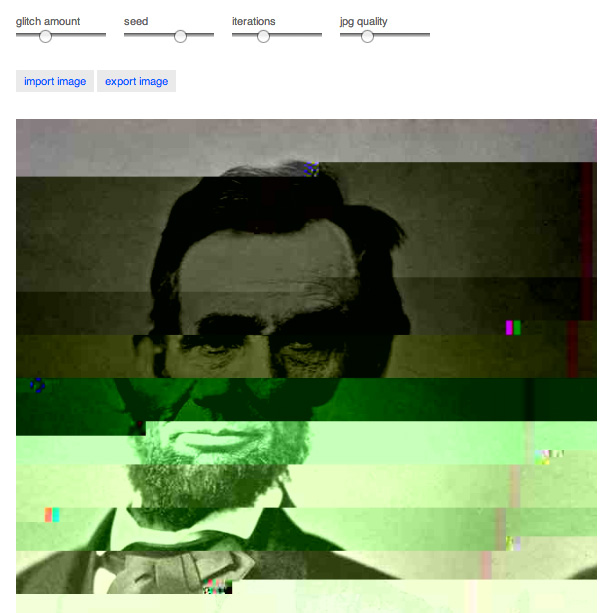
Here’s something perfect for a Friday, or any day when productivity isn’t paramount and you’re looking for something aimlessly creative and fun: do-it-yourself glitch art courtesy of German multimedia designer Georg Fischer.
Just head to the glitch images page at github where you can upload a jpg image and proceed to wreck it (in the manner of a sensitive artist, of course) by dragging sliders.

What exactly do the sliders do? Who knows, but you can immediately see the results, so just play with them until you’re satisfied (or your boss walks by). You can also easily download your creation to save it for posterity.
We’ve mentioned glitch art here before, as the topic of an episode of PBS Arts Off Book video series. In case you missed it, glitch art is created by deliberately damaging the data in a digital file. This is sometimes done by opening an image file with a text editor and deleting or changing the code. The tools at githib make the process a lot faster and easier. But if you want to be an Old School OG (Original Glitchsta), just take a jpg:

Change the file extension so your computer thinks it’s a text file, and edit it.

Then change the extension back to .jpg and open the file to see the result.

This article was last modified on September 13, 2013
This article was first published on September 13, 2013
Commenting is easier and faster when you're logged in!

Recommended for you

Heavy Metal Madness: Decalcomania Mania
One of my favorite specialty printing methods is that of the water-transfer deca...

CreativePro Video: Create a Color Palette From a Photo
In this week’s CreativePro video, Nigel French demonstrates how to make a color...

Peachpit Announced the Publication of Layers: The Complete Guide to Photoshop’s Most Powerful Feature
Peachpit announced the publication of Layers: The Complete Guide to Photoshop’s...