




For almost any print or Web design project, the one-to-many technique can work. In this excerpt, John McWade demonstrates how to use the technique in a magazine spread and on a Web page. He shows you how to tell a fuller story by slicing an image and explores using the image as a basis for harmonizing versus contrasting colors in the rest of your layout.
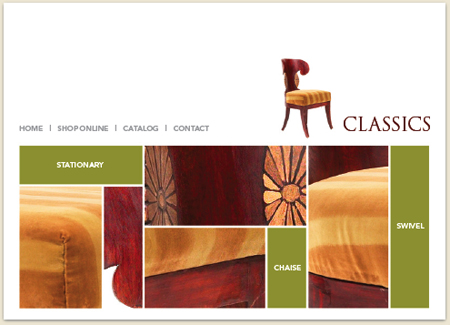
For this web page, John sliced one photo of a chair into five images that show interesting detail.
Click the link “One to Many” to open the PDF file in your Web browser. You can also download the PDF to your machine for later viewing. This how-to is formatted for easy onscreen reading. However, if you prefer paper, see pages 13 through 18 of the PDF, which repeat the information in a format suitable for printing.
To open the PDF, you’ll need Adobe Acrobat or Adobe Reader. We highly recommend Acrobat Reader 7.0 to view Before & After PDFs. To download Acrobat Reader click below:
 .
.
To learn how to configure your browser for viewing PDF files, see the Adobe Reader tech support page.
This article was last modified on May 1, 2006
This article was first published on May 1, 2006
Commenting is easier and faster when you're logged in!

Recommended for you

Free Acrobat Webinar Series
If you have the new Acrobat X Pro software, or are considering it, check out the...

David Blatner's InDesign Tips: Free Plug-in for InDesign Now Available
DTP Tools and David Blatner today jointly announced the release of the free Davi...
Poll Results: How many conferences have you been to?
The results of our poll asking about free fonts, and a new poll asking about you...