


Deneba Canvas 8: Master of Some

Multiple Media Publishing Tools
Canvas is equipped to handle just about any publishing need from single page advertisements and spec sheets, to multiple page documents, to presentations, to Web pages. A new Forms text tool makes it easy to create forms for entering repetitive data. Tabbing moves the text cursor from text box to text box. Master pages automate creation of multi-page documents. Headers and footers can be added as needed. When you are finished you can use the Collect for Output command to assemble the necessary files to hand off to your service bureau. In addition you can publish your document as a PDF file or publish your document directly to the Web. Large Web graphics will benefit from Canvas’s new Image Slicing capability.
What is impressive, and worth the price of the application alone, is the URW Font Library. URW is a 300-year-old German-based type foundry that has amassed an impressive collection of fonts, 2,400 of which ship with Canvas in TrueType and Adobe Type 1 formats. Some type families come in a mind-boggling number of weights and styles. The Garamond that’s included on the disc, for example, has 66 different weights and styles.
The included clip art features a wide variety of images, some pretty cool, some not so cool. Where the clip art is extremely useful is in the scientific, engineering, manufacturing, and building categories. This is not surprising given that 63 percent of Canvas users are technical illustrators, according to Deneba.
Kudos and Brickbats
All in all, Canvas is an excellent application that’s well worth a look. The GUI design is user-friendly and well thought out. The individual palettes are compact, efficient, and functional. And the Docking Bar arrangement keeps the work area free for creating. Never having used Canvas before this review, I was able to get up to speed in no time. If you need help, the Users Guide is over an inch thick and loaded with well-written, easy-to-understand explanations.
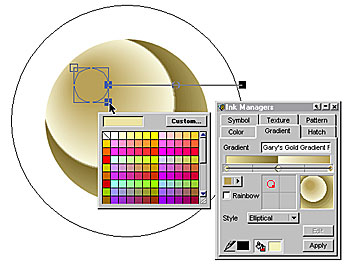
The transparency operations are exquisite as are the gradient color fill capabilities. The Sprite technology is unique as is Canvas’s ability to create bitmap masks and do bitmap image editing tasks one would normally only be able to accomplish in Photoshop or other pixel-editing applications. The drawing and editing tools are well designed and easy to use. If you are familiar with any vector application, you should have no trouble getting up to speed quickly. In short, there is a lot to recommend this product.
But Canvas has its shortcomings, too. I found the Help menus, specifically the HTML implementation of the Help menus, clumsy and not very helpful. Most applications offer context-sensitive help in the various dialogs. So if you need help when exporting a GIF image and need explanations for the various palette options, pressing Help should produce a page relating directly to this topic. The three or four times I hit the Help button, I was informed Canvas could not find any reference for what I was seeking help for, even though Canvas supplied the search criteria. (Maybe this is why the User’s Guide is so thick?) And the help sections themselves are poorly structured. Instead of displaying a sub menu of topics within the Web Publishing topic, for example, I was taken to a section with the daunting revelation at the bottom of the first page that this is page 1 of 46. When I needed help with how to use the FTP client to upload my Web site to my server, I had to scan page by page until I found the information.
While you can name and save views, and select these from the Layout pull down menu, the Zoom percentages pop-up menu at the bottom left of the screen has no entries for the selection, page, and so forth that you find in the other vector applications. The Perspective tool does not permit you to drag the vanishing point to a new location, nor can you modify an object once perspective has been applied. While you can select Pixels for your units of measurement, Pixels are not available in many dialogs where Pixels would be expected. On the other hand, when setting your ruler units and number of divisions, a drop down list on the Rulers dialog has presets for many units, including Pixels.
A selected tool, once used, does not stay selected. For example, draw a rectangle. If you want to draw a new rectangle, you have to select the Rectangle tool again. I would prefer the last selected tool remained active until I select another. Some effects and commands are executed in real time, others require hitting Enter to apply the changes. More consistency in this department would make Canvas a few degrees easier to get synchronized with. The Blend tool can only apply blends to solid-colored objects although you can blend groups of blended objects. Once applied, blends cannot be edited, which seems inconsistent with many of the other tools and effects. Nor can you create a blend of objects containing transparency.
In spite of these nitsy complaints, Canvas is one very efficient application and well worth a test drive if you are in the market for a set of well-engineered tools and effects. You can download a free 15-day trial version at https://www.deneba.com/ although you best have a high-speed modem — the file size is about 80MB! Users of Apple’s OS X will be able to take full advantage of the new speed and power features of the operating system. Although I have not tried the Windows XP optimized version, I would expect a significant performance boost with this new version as well.
Even though Canvas has taken the “jack-of-all-trades” approach, it manages to master just about all. In terms of value, Canvas is first rate. Especially when you consider the broad range of tools and power you get, not to mention the professional clip art and complete URW type library. Users of Canvas 7, or previous versions, should find more than enough reasons to upgrade to Canvas 8. If you create graphics for the Web, and frequently do moderate amounts of pixel editing as well as converting vector graphics to bitmap, Canvas 8 could save you a lot time not having to shell out to Photoshop. I was able to edit an existing bitmap for use on a Web site I’m designing; I adjusted the color and contrast, created a mask, dropped out the background, smoothed the edges, and exported the image as an optimized JPEG image. Tasks you normally would have to do in Photoshop you can do in Canvas as well.
The multi-media publishing capabilities make Canvas very attractive for persons who prefer to work in one application. Canvas if extremely well suited to persons working in corporate art departments or workgroups because the ability to add and pull data from each drawing as well as being able to create self-contained presentations. Illustrators will appreciate the hands on, on-screen, interactive control versus the dialog box approach to creating and editing an image. FreeHand users could benefit from just about every aspect of this application. (About the only thing missing here, is the FreeHand’s cool perspective grid). Illustrator users should really appreciate the breadth of really good features and interactive tools and its user interface.
A version of this story previously appeared in “Communication Arts” (January/February 2002).
This article was last modified on March 13, 2022
This article was first published on January 22, 2002
Commenting is easier and faster when you're logged in!

Recommended for you

Learn About Photoshop CC While You Use It With the New Features Panel
We are all creatures of habit and develop our favorite ways of getting work done...

CreativePro Tip of the Week: Creating Dotted Lines in Photoshop
This CreativePro Tip of the Week on creating dotted lines in Photoshop was sent...
Importing Photos in Adobe Photoshop Lightroom 4: Part 2
Excerpted from The Adobe Photoshop Lightroom 4 Book: The Complete Guide for Phot...