




Abbe wrote:
I like to use InDesign’s auto-numbering feature, but don’t see a way to decimal align the numbers when they reach double digits. When my numerals exceed 9, I stop using the feature and start setting tabs. Am I missing something?
You are missing something, but it’s very easy to see why — it’s not at all obvious how to do this. Here’s a sample of a numbered list. As you pointed out, the decimal points are not lined up:
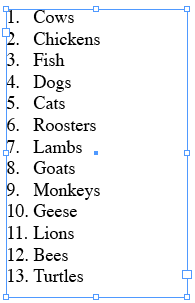
Let’s look at the paragraph style that defines this numbered list:

See that Alignment pop-up menu? (This is a CS3 feature.) If you set that to Right, the numbers should all line up along the right-most character (in this case, the decimal point, or period), right? Yes. But it only works if (emphasize “IF!”) that would not push any of the text out of the frame to the left. InDesign won’t allow that text to hang out of the frame (at least not without severe trickery).
So what is to be done? Increase the left indent and/or decrease the first line indent, so that all the text moves in a bit:

That allows the numbers to have enough breathing room that they can fit in that little margin area:

[Note that there is more on this topic on this post.]
This article was last modified on December 19, 2021
This article was first published on June 10, 2008
Commenting is easier and faster when you're logged in!

Recommended for you

Index Fixes: No Styling in Topic Names
Topic names cannot natively be styled in the Index panel. However, a simple solu...

Make Headings Span Across Multiple Columns in InDesign
Master InDesign’s Span Columns feature with Pariah Burke.
PageProof unveils PreProof™, giving creative teams better first proofs and fewer review rounds
PageProof’s new PreProof™ capability helps designers catch spelling, brand, and...