



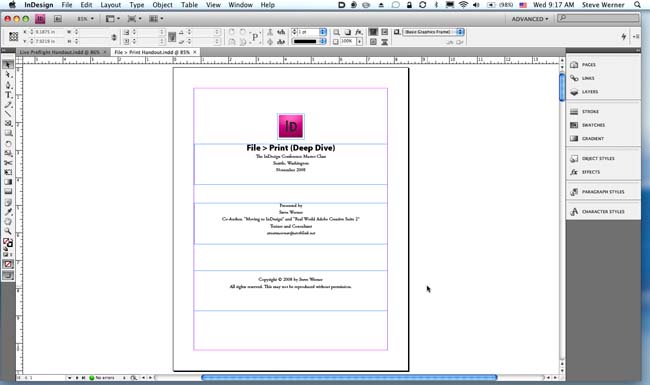
One of the early controversies about InDesign CS4 is the Application Frame. This is part of a revamp of the Adobe Creative Suite 4 interface which is found in almost all the CS4 applications. In Windows, or when selected on the Macintosh, the Application Frame places all the elements of the InDesign workspace in a single window with a gray background. When you move or resize elements within the frame, the other elements resize so nothing overlaps.
Windows users of InDesign are already saying to themselves, “What’s the big deal?” because Windows always displays an application’s elements inside a single window which hides the desktop and other applications. But some Macintosh users are outraged, judging by comments by some early users of InDesign CS4 on the Macintosh User to User Forum. For example, Dave Saunders sounded off: “I hereby declare that I have tried the application frame and found it to be a misguided, annoying, interfering, overbearing abomination.” Macintosh users are used to having floating windows which can show the desktop in the background, or to mix windows from different applications.
Here’s what my screen looks like on my MacBook Pro looks like with the Application Frame turned on:
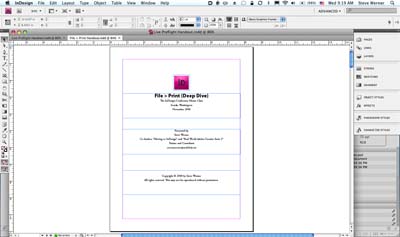
And here’s what the same page looks like with the Application Frame turned off. Notice how part of the Bridge window appears at the bottom left and bottom right behind the InDesign window.
Here are some reasons why I think this controversy is much ado about nothing: (1) The Application Frame is not turned on by default on the Macintosh. It will not appear at all unless you choose Window > Application Frame to turn it on. (2) You can always switch it off. (3) The Application Frame on the Macintosh can be resized to make it smaller: Just drag the bottom right corner, and you’ll see a resizing cursor. When I have the frame on, I typically leave a little bit of the desktop showing on the right, giving me a quick way to jump to it by Option-clicking the desktop (a Mac shortcut that’s been around forever).

Also, although some Mac users claim that this interface is very “unMaclike,” in fact there are several Mac applications?even those from Apple itself, like iTunes?which run in one window.
One of the other great features of InDesign CS4 (and the other Creative Suite 4 applications) is that you can have multiple InDesign documents open as separate tabs in your document window. This can be done with the Application Frame on or off.
I find myself going back and forth: There are some things that the Application Frame is very good for: When I’m teaching a class, or demoing a technique online, I find turning on the Application Frame is less distracting. You can’t see other applications behind InDesign. Also, if I’m heavily using InDesign primarily, I find the same advantage. However, sometimes I may be frequently going between two applications. Then, I’ll turn off the Application Frame so I can see windows from both applications at the same time.
Another part of the controversy is that a couple users have claimed that InDesign CS4 doesn’t remember the size of the Application Frame. Sandee Cohen, who had supported this claim in the User to User forum thread, recanted and said that she was only testing on a late beta version of InDesign CS4 which quit unexpectedly, presumably not saving the frame size. I’ve not found that a problem in the release version of InDesign CS4.
The great thing is that, on the Macintosh at least, you can have it both ways: turn on the Application Frame or turn it off, as you need.
This article was last modified on December 19, 2021
This article was first published on October 22, 2008
Commenting is easier and faster when you're logged in!

Recommended for you

Highlighting an Entire Paragraph with Color
With the right combination of paragraph rules and an underline, you can create a...

What’s New With InDesign CC 2015.2
Adobe has released updates to several important Creative Cloud applications, inc...
The Dual Text Wrap Dilemma
Although you cannot apply an inverted text wrap and a traditional text wrap to t...