




Adobe Photoshop Elements
Photoshop Elements 2.0 allows you to import any photos from any camera. The more accurate information you can give the software about focal length, the better your results. The main advantage to using Photoshop Elements over the Olympus or Canon software solutions, is that with Elements you get a full-fledged photo editing program. For anyone with a familiarity with Photoshop, the interface is a dream compared to the clunky interfaces of the other software. The Photomerge function looks very much like a Photoshop filter dialog box. (see Figure 8).
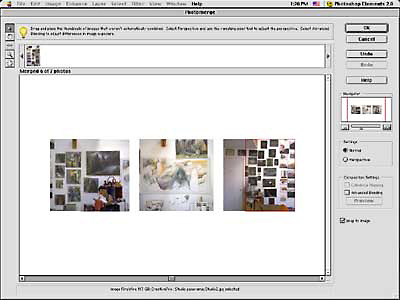
Figure 8: The Photomerge function in Photoshop Elements is really a dialog box. When you choose a series of images to stitch, it automatically orders them alphabetically, so in my case, some of the images had spaces before the numbers, so they didn’t load in the correct order. Although you can manually rearrange, the job Photomerge does is respectable enough so you would do best to rename your files, and try again.
The Photoshop Elements’ Photomerge function results in images that are crisp, with feathered blends between misalignments (see Figure 9). Unfortunately, these feathered blends create strange distortions that most likely will need fixing — even if you reduce the image a lot. But fixing these images is made easier by the fact that with Photoshop Elements, at least you have built-in image-editing capabilities.

9a

9b

9c

9d
Figure 5: Photoshop Element’s Photomerge function creates feathered but distinct transitions between misalignments in both the Canon (9a) and Olympus (9b) shots. The images will most likely need retouching (9c-d), but PhotoElements is the only of these software programs to provide retouching components within the application.
This article was last modified on January 3, 2023
This article was first published on April 29, 2003
Commenting is easier and faster when you're logged in!

Recommended for you

Pin the Tail on the Camera
They say necessity is the mother of invention, but it’s clear nowadays that Kick...

Photoshop Tip: Quickly Resize the Photoshop Canvas with Reveal All and Trim
If you’ve ever designed with type in Photoshop, you’ve probably enco...
What’s New with Lightroom Classic CC 8.0
The venerable Lightroom application got a bit roughed up last year. For several...