



InDesign CS5.5 brings many improvements to the creation of EPUB files. A posting here revealed some of the improvements. However, recently I ran into a bug which occurs when exporting EPUB out of InDesign CS5.5, which does not occur in InDesign CS5. It has been described as a WebKit encoding bug.
I was working on creating two eBooks, and I had started them in InDesign CS5. When InDesign CS5.5 was completed, I happily opened them in the new version because using CS5.5 required a lot less postprocessing of the files. The chapters passed EPUB validation, but when I tried to preview some of them on my iPad (and my iPhone) in Apple’s iBooks eBook reader, I saw this strange message (shown in a screen capture from my iPhone):
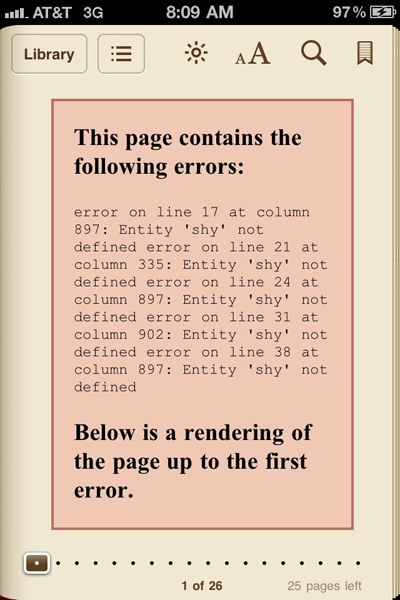
WebKit Error Message
I’m a relatively new at working with creating EPUB files, but I’ve learned quite a bit with the help of books like Elizabeth Castro’s EPUB Straight to the Point, Gabriel Powell’s webinars, and Anne-Marie’s Lynda.com videos. But with this error I kind of hit a wall because I had not seen this documented anywhere. More confusingly, the same files worked fine when exported out of InDesign CS5, and passed EPUB validation. For a few weeks, I was stymied. Because the error appeared at the beginning of a chapter, I assumed that the error was at that location.
Fortunately, I was able to attend and present at the InDesignSecretsLive.com Print and ePublishing Conference last week. There I was able to show my problem to EPUB gurus Ron Bilodeau of O’Reilly Media and Gabriel Powell. They described it as a WebKit encoding bug.
Ron opened up the InDesign CS5.5-generated EPUB in Oxygen, an excellent XML and EPUB editor. The error message actually points to line numbers in the XHTML code. Note in the error message shown above that the first error occurs on line 17. In Oxygen (or another editor like TextWrangler when you turn on line numbers) it appears like this.
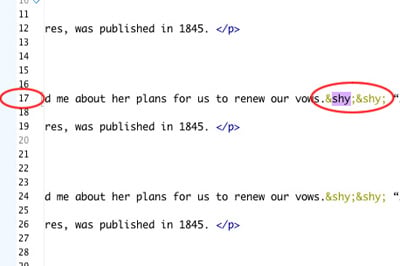
Shy Entity in CS5.5 EPUB
The “shy” character here refers to a discretionary hyphen at some places in the text. Here is the problem as described in a blog posting Ron pointed me to:
This is a very common XHTML mistake, now growing in visibility much due to the Google Chrome boom. Google Chrome is based on Webkit, an open source browser engine also used in Apple’s Safari; Webkit is very restrict [sic] on XHTML rules.
This particular error is caused due to common HTML entities usage on XHTML outputs, which follows XML entities rules. Basically means you are using a -like entity, when in XHTML you should use a [XML-encoded] entity.
The posting also shows a chart of HTML and XML entities which differ:
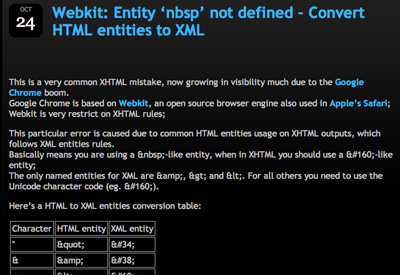
Table of HTML & XML Entities
The bug doesn’t show up with a failure to validate the EPUB. And it won’t show up in eReaders with a different rendering engine like Adobe Digital Editions. But it will show up in eBook readers like iBooks which use the WebKit rendering engine. It may happen with characters other than a discretionary hyphen, but I haven’t investigated that.
In InDesign CS5, when the EPUB was exported, such entities were not included in the EPUB. The same passage of text is shown below in the EPUB XHTML generated by InDesign CS5:
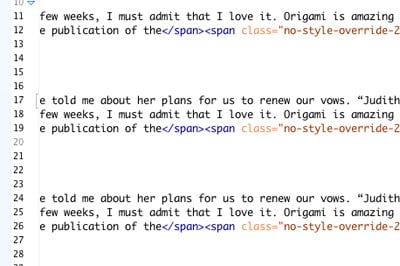
No Shy Entity in CS5
At the conference we were told by Chris Kitchener, the InDesign product manager, that EPUB export was totally rewritten in InDesign CS5.5. Apparently, the fix for the WebKit bug that was in InDesign CS5 EPUBs was accidentally dropped in InDesign CS5.5. I’ve passed the bug report on to him.
The fix in this case is to identify where the bug is and remove it. In my case, I searched my chapters for discretionary hyphens (not used in EPUB) and removed them. You could also edit the XHTML code.
And what does the word “shy” mean? I found this reference which explained it:
The ISO Latin 1 character code, also known as ISO 8859-1, and the ISO 8859 character sets in general, contain a character named soft hyphen, abbreviated SHY, code value 255 in octal. In general, the ISO 8859 standards specify the characters and their codes only, not the use of the characters. However, soft hyphen is one of the few exceptions.
This article was last modified on December 21, 2021
This article was first published on May 30, 2011
Commenting is easier and faster when you're logged in!

Recommended for you

Tip of the Week: Automatic Article Arrangement
This tip was sent to Tip of the Week email subscribers on July 24, 2014. Sign up...

How to easily thread text frames for ePub output
Frustrated trying to thread all your text frames together for ePub output? Look...
InDesign Magazine Issue 72: InDesign to Kindle
We’re happy to announce that InDesign Magazine Issue 72 (April, 2015) is now ava...