




M. asked:
Can I customize the crop marks and registration marks that InDesign creates?
 I never thought you could until Olav Martin Kvern, my co-author on Real World InDesign discovered a secret method using PMD (also known as .mrk) files. It’s obscure, it’s not necessarily for the faint of heart, but it’s not that hard and it’s very powerful.
For example, you could make an .mrk file that places the page information on the page instead of outside the trim area. This might be helpful if you were printing a Letter sized page on Letter sized paper and didn’t have room for the crop marks and page info.
Ole and I wrote up the MRK file definition in Real World InDesign, but we’ve decided to post that section here as a PDF file for everyone to enjoy.

The PDF file includes several examples, including some source code that you can download from here. For example, there’s a mrk file that makes InDesign’s printer marks look very similar to those found in QuarkXPress.
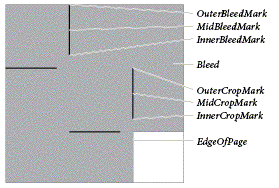
The description includes a list of customization codes and explanations for how to type them in an MRK file, including detailed illustrations such as this one:
Obviously, if you like this kind of InDepth information, we hope you’ll go ahead and buy the whole book itself.
This article was last modified on December 18, 2021
This article was first published on June 28, 2007
Commenting is easier and faster when you're logged in!

Recommended for you

Convert to Outlines in InDesign and Keep Your Editable Text
Khara Plicanic creates text outlines and keeps an editable copy with one click!
Using 3D in Affinity
Create rotatable 3D objects using Affinity and Canva AI with Steve Caplin.

Interview with Brittney Megann, CEO and Head Socialista
A self-taught CEO shares how she built a marketing business after a life-alterin...