




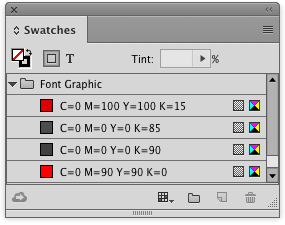
Creating color groups is a great way to keep the colors in your InDesign Swatches panel organized. You can create color groups by selecting the swatches you want, and clicking the New Color Group button at the bottom of the Swatches panel.
But did you ever notice that in the New Color Group dialog box there is another option to create a color group from the selected items in your layout? Try it sometime!

This article was last modified on January 12, 2026
This article was first published on July 26, 2016
Commenting is easier and faster when you're logged in!

Recommended for you

QuarkXPress to InDesign Conversion Guide
There are more people that need this Guide than you think.

Interview with Robin Schneider, Illustrator Fashion Star #2
Q&A with fashion art expert Robin Schneider
TypeTalk: Laura Worthington, Script Designer Extraordinaire
Scripts have become some of the most popular typestyles in use today. They can b...