


Create and Collaborate: Adobe DesignTeam Brings Project Management Online


Review and Annotate
Adobe DesignTeam sports many powerful and useful features. For example, in the file listing (part of the Project section) team members can do more than simply upload and download files; they can reserve files to prevent team members from overwriting their edits. The Adobe DesignTeam environment is also WebDAV (Web Distributed Authoring and Versioning) compliant. Configuring Adobe applications (like Photoshop, Illustrator, or InDesign) to connect to Adobe DesignTeam is as simple as entering a URL into a dialog box. We successfully opened files from and saved files to the server directly from within Photoshop.
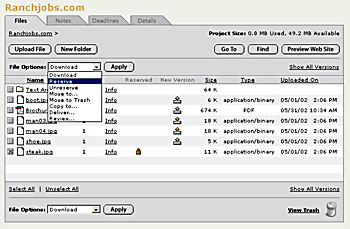
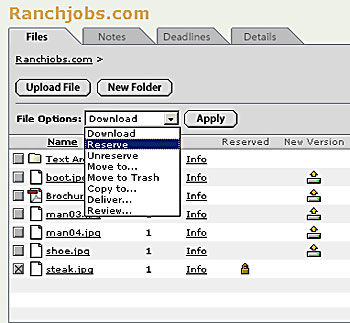
Figure 2: Team members can easily upload and download source files (top). Notice that individual team members can reserve a file — which effectively locks the document and prevents two users from overwriting one another’s edits (close-up, bottom).
In order for a document to be viewable as part of a Review session, it must be in a Web-compatible format (such as GIF, JPG, or PDF). Again, Adobe DesignTeam earns kudos for generating PDFs on the fly from a wide variety of formats, including Word and Quark EPS (but not native Quark files).
We also like the fact that Adobe DesignTeam distinguishes between members of the workgroup and non-team members (read “clients”) who nevertheless must review documents online. While the number of team members is limited by the subscription plan you choose, the number of potential reviewers is always unlimited. So you can invite as many participants to a review session as your heart desires at no extra charge.
The built-in annotation tool — and there is only one — is both easy to use and extremely limited (see figure 3). You can add electronic sticky notes to a document (each note is color coded to identify the reviewer). If you require more robust annotation tools, however, you can opt to review a document using Adobe Acrobat 5.0.5. This method requires you use the full version of Acrobat, not the free Reader. Acrobat gives the reviewer a host of markup tools, including the ability to highlight text, draw freehand, or apply a stamp.
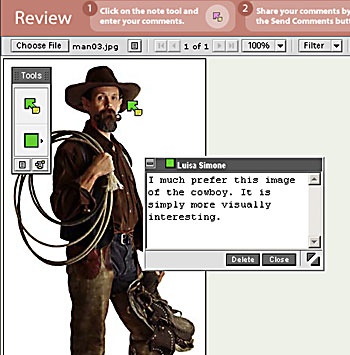
Figure 3: Adobe DesignTeam provides only one, supremely basic annotation tool for online commentary–the digital sticky note.
This article was last modified on January 3, 2023
This article was first published on August 15, 2002
Commenting is easier and faster when you're logged in!

Recommended for you

10 Essential Tips for PDF Comments
When you have to communicate with colleagues about the content in a PDF, it’s mu...
How to Move Photos Between Lightroom and Photoshop
When it comes to working with photos, Adobe gives you two powerhouse pro tools,...
Using Photoshop Templates
Do you suffer from Blank Page Syndrome like I do? Instead of staring at the void...