




In a previous post, I discussed using gradients to create a stroke with only two of the corners rounded. This technique works well for when you using on top of a white (or other solid color background).

But obviously, this doesn’t work so well for use on a patterned, textured, or photographic type background.

While you could apply a multiply blending mode to the stroke (so that the white color essentially drops out), this will alter the the color of the other half of the gradient.

The truly transparent bottom half is surprisingly easy to achieve.
1. Start with a solid colored stroke, with rounded end caps. Make sure the stroke alignment is set to Outside. (I’m not sure why this matters, but it only works when the stroke is aligned this way).
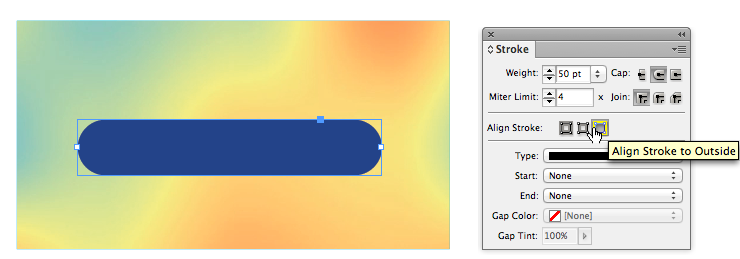
2. Next, go to the Effects panel and use the Gradient Feather settings shown below. Note that while it looks like there are just three gradient stop, there are actually four. For details on setting the gradient stops like this, see Part 1 of this this article mini-series.

There is one drawback to using this effect on a stroke: It can’t be used within a paragraph rule. (But I suppose that is true of any effect, as paragraph rules fall into the Effect Panel category of “Text.”) However, if you’re in the market for a flat-bottomed stroke, perhaps this trick will suit your needs.
This article was last modified on December 30, 2021
This article was first published on March 16, 2013
Commenting is easier and faster when you're logged in!

Recommended for you

Opinion: InDesign’s Auto-generate Alt Text Feature Needs to Change
How it might damage your accessibility workflow and how it can be fixed
Affinity for Photoshop Users
From real-time previews to added adjustments, Affinity special effect and lighti...

Quick Wins: Handling Images in InDesign
Use these five resources to boost your image-handling skills in InDesign