




If there’s one thing I like even better than sharing tips and tricks in the InDesign Tip of the Week email, it’s getting a response from someone with an even better tip. And that’s what happened last week when I got this email from Mary Posner about the tip I sent out on copying a file path from the Links panel:
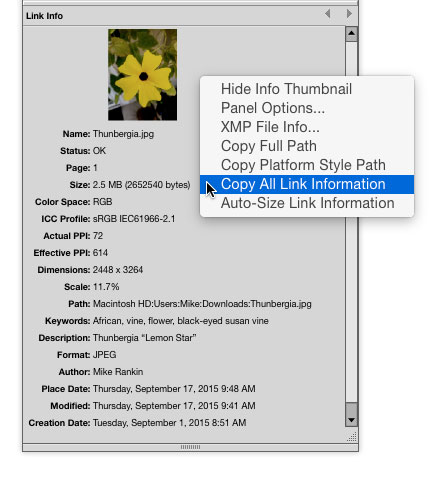
You probably already know about this, but you can also copy any information from the Links panel by right-clicking on the item you want to copy in the Link Info window.
Thanks for a great tip, Mary!
Indeed you can set up the Links panel to show all kinds of information about a placed file, and then copy that information as text to use in InDesign or anywhere else. To customize the Link Info section of the Links panel, go to the panel menu and choose Panel Options (or just right-click in the Link Info section).
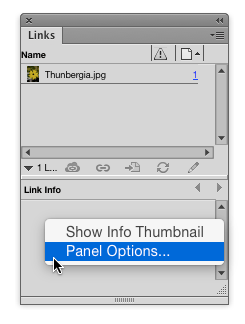
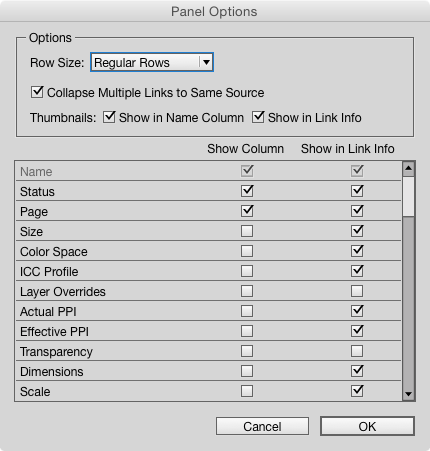
Then in the dialog box, select the items you want to appear in/copy from Link Info and click OK.
Then to copy a particular piece info about a placed file, click on the file name in the Links panel, move your cursor to that item in Link Info (your cursor has to be over the text, if you’re just next to it you won’t see the option to copy specific info), then right-click and choose the appropriate Copy option.
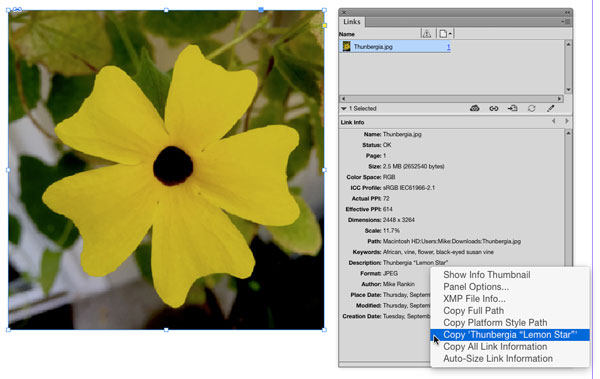
The info will be in your clipboard to paste into InDesign or elsewhere.
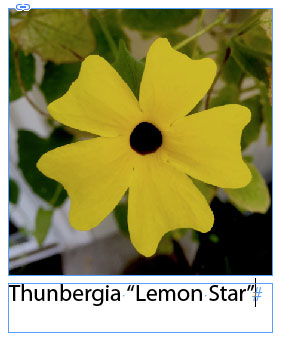
Or if you want to supersize it, you can copy and paste all the link info at once.

This article was last modified on July 25, 2019
This article was first published on September 17, 2015
Commenting is easier and faster when you're logged in!

Recommended for you
How to Balance Text Columns Automatically and with Baseline Grid
Bring balance to your InDesign spreads with this Text Frame Option.

What’s New in Photoshop 27.10
The August 2026 release brings a range of new tools and techniques—plus a comple...

Dump Pasted or Embedded Images
Pasted images (images without a link in the Links panel) and embedded images mak...