



Hey folks, it’s time for another InDesign mystery that you can solve for a chance to win an awesome prize!
Here’s the scenario:
You open up an InDesign layout containing a placed image of a poster. The image has a drop shadow that you’d like to adjust.

image from freevintageposters.com
But when you select the image with the Selection tool and look in the Effects panel, no drop shadow effect is listed.

Nor is there any drop shadow in the image file.

The image is a simple JPEG, placed by itself into a regular rectangular image frame, alone on the page.
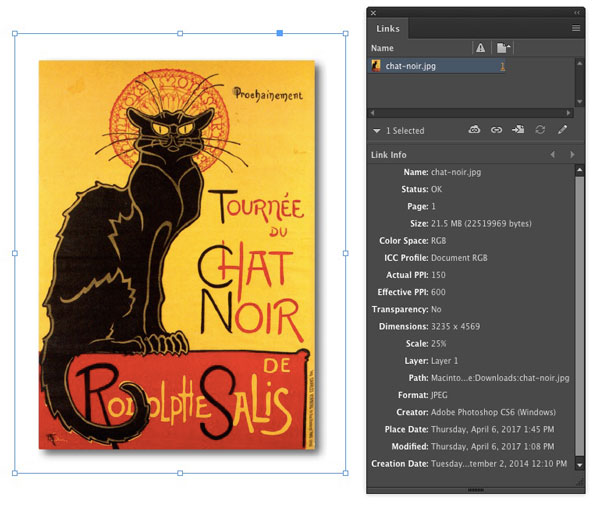
Where is this drop shadow coming from?
This month’s prize is full access for 3 months to the video archives for PePCon 2016 or the CreativePro Conference (up to $495 value!).
The winner will be chosen at random from all the correct answers I receive before April 19, 2017
Enter now by emailing your solution to mike at indesignsecrets.com
Note: Comments are closed on this post so no one gives away the answer. Good luck!
This article was last modified on July 25, 2019
This article was first published on April 12, 2017
Commenting is easier and faster when you're logged in!

Recommended for you

New Contest! The Case of the Text on Top of the Frame
Solve this InDesign mystery for a chance at winning a great prize.
Dealing with Corrupt InDesign Files
Recently, I was contacted by a major university press regarding a problem they h...
Contest! Unravel the Mystery of the Low First Baseline and Win
You don’t have to be Sherlock Holmes to love a good mystery, especially wh...