



Hey folks, it’s time for another InDesign mystery that you can solve for a chance to win an awesome prize!
Here’s the scenario:
You’ve been assigned to do the production work on a new sci-fi novel about an unlikely hero who works in a fast food joint in some far flung corner of the galaxy.

You’re almost finished when you get a call from the publisher saying that the name of the main character has to be changed to avoid a lawsuit. They give you the new name of the character and you plug it into InDesign’s Find/Change to replace all instances of the original name.
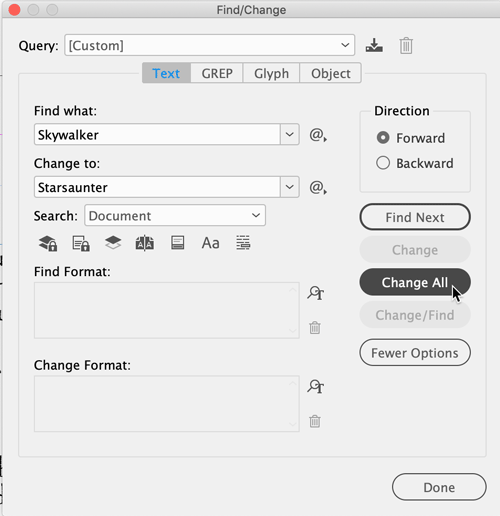
But you notice that the character’s name in the running header didn’t change.

The text frame containing the header is not locked. It’s not on a locked or hidden layer. The text in the frame is real live text, not any kind of text variable. The scope of the Find/Change was set to Document. And no particular formatting was specified.
Why wasn’t this instance of the character’s name found/changed by Find/Change?
The prize is 3 months access to videos of any 2 days of CreativePro Week 2018!
The winner will be chosen at random from all the correct answers I receive before April 25, 2019
Enter now by emailing your solution to mike at indesignsecrets.com
Note: Comments are closed on this post so no one gives away the answer. Good luck!
This article was last modified on July 7, 2021
This article was first published on April 17, 2019
Commenting is easier and faster when you're logged in!

Recommended for you

The Case of the Curious Commas Contest Answer and Winner
Solve this InDesign mystery for a chance at winning a great prize.
The Case of the Weird Wrap Contest Answer and Winner
The solution to our latest InDesign mystery revealed.
