




If you’ve ever used InDesign’s PDF form tools to make a List Box or Combo Box, you know what a pain it can be to add a long list of choices manually. So. Very. Boring.
That’s why InDesign scripter Chuck Weger created the ComboMambo script. It allows you to import a list of items directly into a form field to save all that error-prone typing (and your sanity).
You can download ComboMambo here.
To use ComboMambo, select a Combo Box or List Box form field with the Selection tool.

Then run the script. You can run it just by double-clicking it in macOS or Windows. Even better: install it in your InDesign Scripts panel. Need help installing the script? Check out this post.
You’ll be prompted to select a plain text file (with a .txt suffix) containing the set of items you want in the List or Combo Box.

That’s it! Each line of text in the file will be added as a separate choice in the InDesign Combo or List Box.
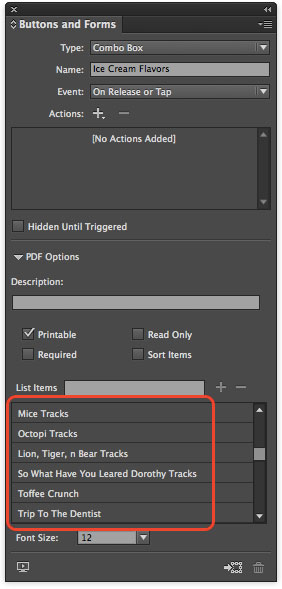
Note that you must have your list items in a plain text file. not a Word doc, RTF file, etc.
Thanks, Chuck!
This article was last modified on March 18, 2022
This article was first published on July 9, 2014
Commenting is easier and faster when you're logged in!

Recommended for you

Accessibility Plug-ins for InDesign
Generate PDFs that are more accessible with more ease by using these two new plu...

The 5 Rules of Efficiency for InDesign
You'll rake in the efficiency jackpot every time with these five basic rules.

Resizing InDesign Layouts with AI
Most designers don’t create a single deliverable anymore. They create campaigns....