



In my experience, there are there are two keys to achieving amazing feats of efficiency and productivity in InDesign: sugar and caffeine scripting and GREP. GREP gives you amazing text processing and formatting power. Scripting allows you to handle a vast amount of work in the blink of an eye. So imagine what you could achieve by creating your own custom scripts that execute chains of GREP queries on your InDesign documents, effectively combining the powers of scripting and GREP. This could be life-changing stuff.
What’s that you say? Sounds great but you don’t know how to script? And you can only handle relatively simple GREP queries? Well fear not, you are the perfect person who should check out a clever solution by Gregor Fellenz. It’s a free script called ChainGREP, and when you run it, you get a dialog box showing all the GREP queries you have saved in InDesign.
You can then select a sequence of those queries
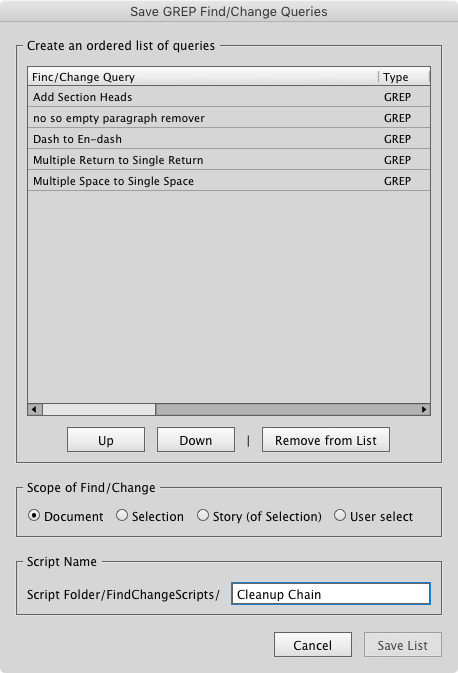
and save that sequence in a new script.
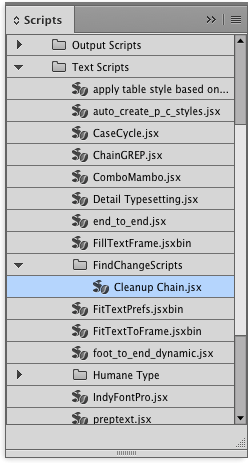
Then just double-click the new script to run it, and sit back and enjoy the show.
This is so cool because a) you can create incredibly useful scripts without knowing how to script at all, and b) for most of us mere mortals, it’s a lot easier to accomplish tricky GREP tasks with several simple queries, instead of one complex query. Simple queries are just easier to grok, write, and troubleshoot. And now with the help of ChainGREP you can run any number of queries with one double-click.
Even cooler: the queries are saved in the new script you create, so it’s totally independent and portable. You can put it on another machine where those GREP queries don’t exist and it will work just fine.
To find out more about the script and download it, check out this post at Tim Gouder’s InDesign blog. Note that the post is in German, but your browser’s translation will probably be all you need to figure things out (and the script comes in an English version).
Thanks Gregor and Tim!
This article was last modified on July 25, 2019
This article was first published on March 16, 2017
Commenting is easier and faster when you're logged in!

Recommended for you

How to Add a History Panel to InDesign with Scripts
Wish InDesign had a History panel? Try these scripts that allow you to access al...

InDesign Magazine Issue 71: Fine Art
We’re happy to announce that InDesign Magazine Issue 71 (March, 2015) is now ava...
