



QuickTime VR
Though available for Macintosh only, QuickTime VR Authoring Studio is the absolute best stitching software I have found among the several I’ve tried both for the Macintosh and PC. Of the others I’ve tried, most either provided no preview, or the images were so small that I could barely identify them. A competitive product for both the Mac and PC — VR Worx, from VR Toolbox — has a good reputation as a serious QuickTime VR Authoring Studio competitor, but I have not had the pleasure of testing it. I have seen panoramas made with this software, however, and they look very good.
Both QuickTimeVR Authoring Studio and VR Worx yield professional-quality results, and both command a hefty price — $395 for QTVR Authoring Studio and $299 for VR Worx. If you simply want to stitch together quickie panoramas to share with family and friends, you may be able to get away with any of a number of less-expensive solutions. For instance, MGI sells its $49.95 Photovista for both Macs and PCs, ArcSoft sells its Panorama Maker 2000 for both platforms for $29.95, and the Home edition of PixAround.com’s PixMaker (PC only) can be had for a mere $19.95. With any non-professional solutions, however, be ready for some limitations: Some solutions restrict images size to only several megabytes, for example; I routinely make 50MB to 80MB panoramas. Some inexpensive solutions also just don’t handle the stitching process as well as their pricier, pro-quality cousins. I continue to use the Apple QuickTIme VR Authoring Studio and am quite happy with it, though no upgrade has been offered for years.
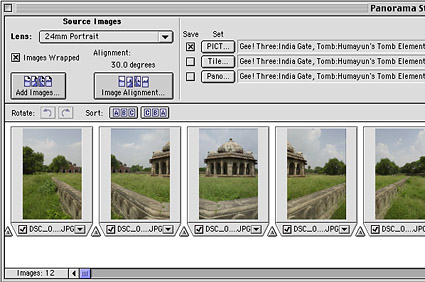
Apple Computer’s QuickTime VR Authoring Studio features a good interface, excellent tools for stitching, and a separate window for adjusting images for manual fit when the program fails to find the correct common points between images.
Apple’s software is uncanny in its ability to find the common points between images, even if the camera wasn’t level during exposure. The result is almost always satisfactory. Occasionally I have stumped it, though. On one image of the Golden Gate Bridge, the software couldn’t differentiate between the many vertical cables that support the bridge. The software got slightly confused and stitched two of the photos incorrectly.
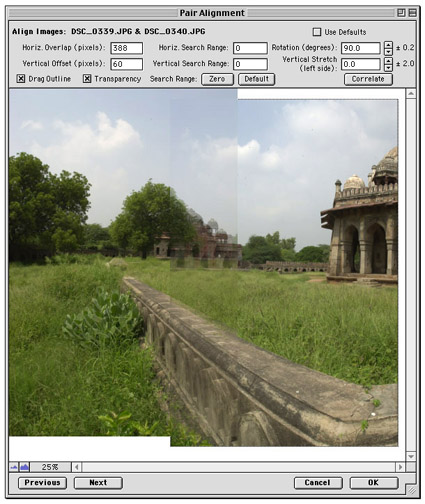
QuickTime VR Authoring Studio features a separate window for the manual adjustment of pairs of images, for when the software doesn’t stitch images correctly on its own. You drag the image on the right over the image on the left until the positioning is correct.
Fortunately there is a separate window for giving positioning hints to the program. This frame-alignment window puts an image on the screen, and a transparent view of the adjacent image. You drag the transparent image atop its partner image to the correct position, click on the Zero button, then proceed. After I aligned the frames manually, the Golden Gate appeared perfectly stitched.
When the stitching process is complete, the software will make a single panoramic image, and will optionally make a navigable image in QTVR format — an image viewers can pan about by moving their mouse. Creating the QTVR version is easy, and people love these images. I have made quite a few heads turn when showing them. They are most appropriate for the Web, and for making audiences suffer from vertigo in a darkened seminar room.
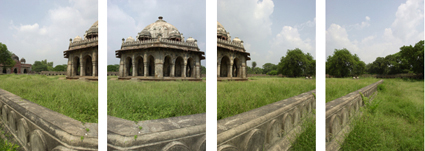
Four of 12 images in a 360-degree panoramic image. When photographed correctly, they all share the same exposure and focus, and there is an overlap between images.
This article was last modified on December 13, 2022
This article was first published on May 22, 2001
Commenting is easier and faster when you're logged in!

Recommended for you

Heavy Metal Madness: QuarkXPress 6.0 vs. Hand Composition
In my review of QuarkXPress 6.0 a few weeks ago here on creativepro, and in Davi...

Marcel’s Letters: A Font and the Search for One Man’s Fate
Marcel is more than just a beautiful script typeface. It is the product of a fan...

10 Find/Change Tips
Want to learn more about Find/Change? Check out these 10 Find/Change tips!