




Here’s a quick design tip on working with photos from issue 43 of Before&After Magazine.
Different distances tell different stories. One photo shows a baseball in the dirt, completely pedestrian; at arm’s length you’d pick it up and throw it.

But zoom in, and the story is different.
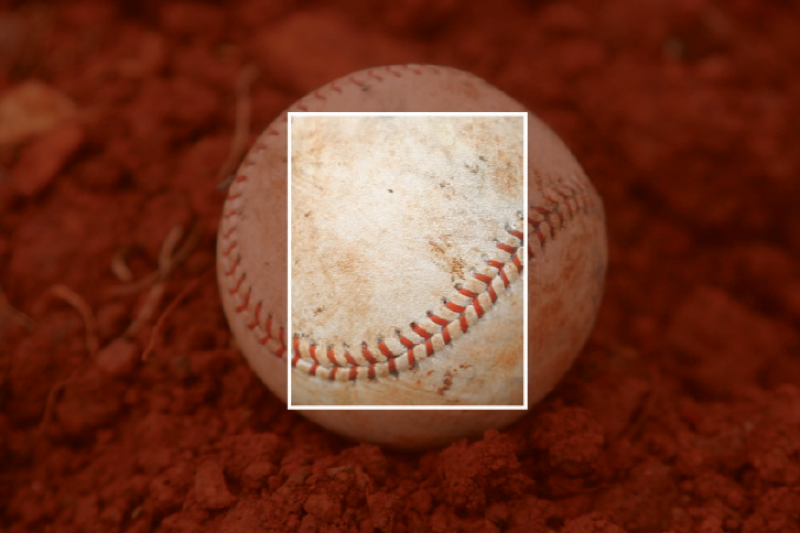
This is an intimate distance. You see the leather, the dirt, the seam, the weathering. They “fill the screen,” activate your senses. You can feel the ball in your hand. You hear the crack of the bat, the roar of the crowd; you can touch the history of the game. Good photos reveal worlds within worlds.

Zoom in and see what you find. You’ll be surprised.
CreativePro members can download original content from Before&After Magazine, a beloved resource that taught a generation of newly minted digital designers how to design and communicate effectively with the written word. See our archive here.
© John McWade/Before&After Magazine, courtesy of Gaye Anne McWade.
This article was last modified on January 4, 2026
This article was first published on October 4, 2024
Commenting is easier and faster when you're logged in!

Recommended for you
Before&After: Presentation Lessons from Apple
Timeless lessons from Apple on crafting a perfect presentation

Before&After: Design a Chalkboard Web Banner
Handwriting on a strong design element makes a powerful, simple statement.
Before&After: Gestalt Theory: Proximity
When separate elements are grouped, they appear united just because they’re clos...