




There aren’t many designers who would consider setting text colored with gradients that oscillate between pure red and blue. Yet that seems to be an effective way to make long passages of text more readable, according to the makers and users of a browser extension called BeeLine Reader.
Once installed, you can use BeeLine Reader to reformat a web page and apply gradients to all the text. The gradients are applied in such a way that each line of text starts with a different color, making it easier for your eye to jump to the right line, especially on mobile devices with small screens.
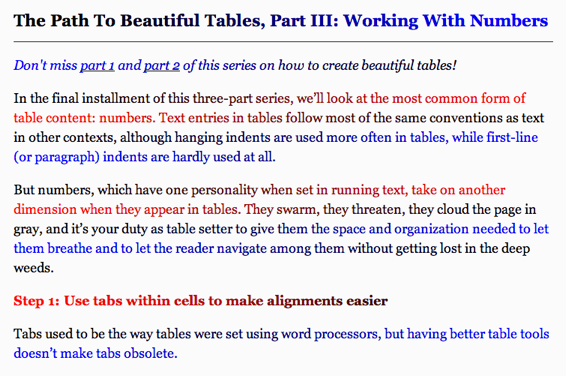
Settings allow to you choose from several themes. So you can opt for garish gradients of pure red and blue or more subtle gradations of gray.
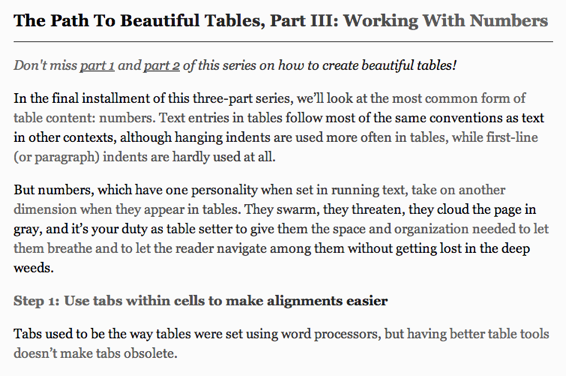
A Stanford University study showed use of BeeLine Reader increased reading speed from 10–30 percent. It will be interesting to see if this idea catches on and starts appearing in mobile reading apps.
This article was last modified on January 8, 2023
This article was first published on October 7, 2013
Commenting is easier and faster when you're logged in!

Recommended for you
Creating Better Brand Images with Graham Clifford
Branding is the term used to describe the creation of an identity for a product,...

A Garden of Delightful Type
Here at CreativePro, we’ve seen a lot of type. Digital type, printed type, wood...

SkyFonts Service Goes Live
SkyFonts, the cloud-based font rental service by Monotype Imaging has been offic...