




Distressing artwork is among the most popular modern design techniques. The style (also known as grunge) hasn’t yet become a cliché because distressed design doesn’t necessarily look grungy: Most distressing is subtle, adding texture, depth, age, and realism.
Used with restraint, the 623 brushes below–all free, of course–can subtly improve many images; applied heavily, they can turn even the sweetest image into a dark, insidious opposite. The end effect is up to you.
Cracked (22 Brushes)

Drip and Splatter (20 Brushes)

Splatter (23 Brushes)

Ink Drips (35 Brushes)

Torn Paper, Straight Edges (10 Brushes)

Cracks (22 Brushes)

Crack Effect (15 Brushes)

Crack (5 Brushes)
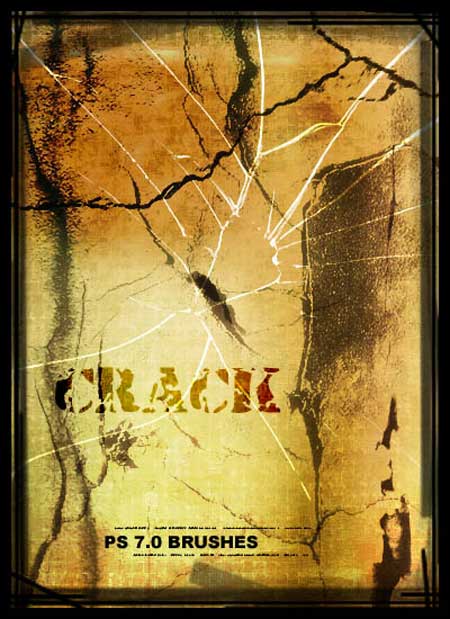
Cracked (15 Brushes)

Old Book Pages (5 Brushes)

Old Letter (32 Brushes)

Vintage Grunge (17 Brushes)

Wanted Poster (9 Brushes)

Old Post Card Set I (9 Brushes)

Centric Ink Vol. 2 (26 Brushes)

Curl and Twirl (7 Brushes)

Anigraphuse Nature (7 Brushes)

Melancholy (8 Brushes)

Coffee Cup Stains/Rings (5 Brushes)

High Res Dirt (8 Brushes)

Wall Textured (6 Brushes)

Grungy Texturing (15 Brushes)

Go to page 2 for brushes that evoke rust, splatters, stains, steampunk, scratches, and more.
This article was last modified on July 20, 2021
This article was first published on November 15, 2010
Commenting is easier and faster when you're logged in!

Recommended for you

How to Adjust Colors in Photoshop Using Hue and Saturation
Learn how to manipulate an image’s colors using Photoshop’s Hue and Saturation s...
How to Turn a Photo into Graffiti in Photoshop
Create a spray-painted masterpiece in Photoshop with Steve Caplin.
How to Adjust Colors Using Photoshop’s Contextual Task Bar
Learn how to use the Photoshop Adjust Colors feature to make quick, non-destruct...