



Normally, when you type a straight single quote, it gets converted into a curly (“typographers”) quote, right? That conversion is controlled by the Use Typographers Quotes checkbox in the Type pane of the Preferences dialog box. If you turn that checkbox off, the conversion stops happening. Note that you can enable/disable the checkbox even without opening the dialog box by pressing Command-Option-Shift-‘ (quote) or Ctrl-Alt-Shift-quote. That’s just a fast shortcut for when you need a straight (non-converted) quote.
But that’s not the end of the story. Most people don’t realize that the Dictionary pane of the Prefs dialog box lets you control what character you want the quote to turn into. There’s a number of options, based on different languages:
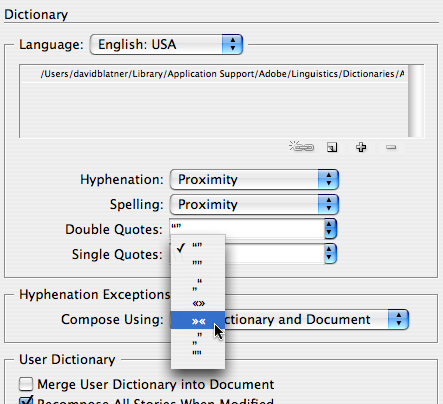
But what’s particularly interesting about that field is that you can change it to any two characters you want! For example, you could type in some weird characters. For example, here I’ve typed em dashes in one field and backslashes in the other:

The result, of course, is that the automatic quote conversion creates all kinds of mayhem.
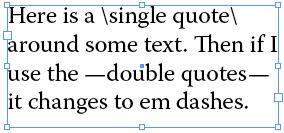
Is that useful? I bet someone here can think of a cool use for this auto-correction feature, especially for typesetting some non-traditional, ee cummings kind of poetry. Of course, I didn’t get a lot of sleep last night, so perhaps I’m just seeing cool features where there are none.
This article was last modified on December 18, 2021
This article was first published on January 3, 2008
Commenting is easier and faster when you're logged in!

Recommended for you

InDesign & Word Styles – How well do they transfer with each other?
Moving Styles back and forth between InDesign and Word is possible, but some of...
Faster Print and PDF Output
If you use print or PDF presets, it can be tedious to have to click through dial...

Batch Rename Files in Adobe Bridge
The next time you need to rename a set of files, don't do the job manually—use A...