




Adobe has released a new free extension for Photoshop CS6 that provides two new filters for smoothly blending between colors. The extension (currently available for Mac only) is called Interpolate and can be downloaded from Adobe Labs.

After you install the extension, you get two new menu items in the Filter menu: Interpolate and Match Edges
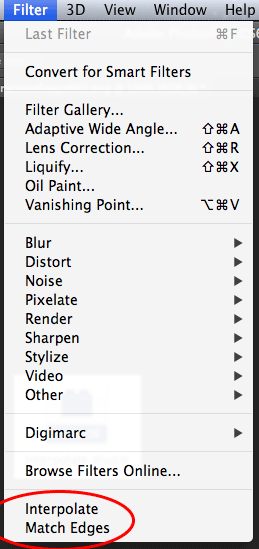
Acording to Adobe Labs, Interpolate fills the transparent areas of the current layer with a smooth mix of the colors in the opaque areas. Match Edges changes the colors at the edges of the current layer to match those of the layer below it, and smoothly distributes this change through the layer.
This article was last modified on September 19, 2012
This article was first published on September 19, 2012
Commenting is easier and faster when you're logged in!

Recommended for you

Tips for Shooting and Editing in Camera Raw
Why Shoot in Raw Format? Whether you realize it or not, if you are using a DSLR...

Photoshop Blur Gallery: Spin Blur
Learn a non-destructive, highly controllable way to apply selective blurs to ima...

Creative Cloud Storage: Where Does It Go?
When you create using Adobe Creative Cloud applications, where is your work save...