



If you’ve ever used InDesign’s Object Layer Options feature to change the appearance of placed Illustrator files, you probably stumbled on a rather annoying problem. If layers were added or removed in the Illustrator file after it had been placed, InDesign really didn’t know what to do, so it discarded any layer visibility overrides you had set.
You would get an alert, but there was no fix other than manually going back to Object Layer Options and resetting things the way you wanted them.

A New Preference to Control Layer Visibility Overrides
But a couple versions back (in CC 2015.1), a new checkbox quietly appeared in InDesign’s File Handling preferences.
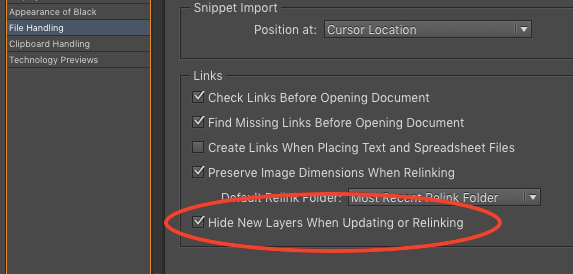
When enabled, this preference tells InDesign to ignore any new layers in the Illustrator file and keep them hidden. In other words, leave things in InDesign as they were, thank you very much. It’s a small but significant change for the better, especially for folks who commonly use the Object Layer Options feature to set layer visibility overrides. Unfortunately, this preference currently only affects Illustrator files. If you adjust the visibility of layers in placed Photoshop files, and then change the layers in the PSD, you’ll encounter the same problem as always.
See also: Changing the visible layers for Illustrator documents and Hey, Buddy. Can You Spare a Layer?
This article was last modified on July 25, 2019
This article was first published on June 6, 2016
Commenting is easier and faster when you're logged in!

Recommended for you

TypeTalk: Hand-Drawn Type
Learn how to use informal letters that look like (or are) actual handwriting as...

Problems Printing Multiple Copies?
A number of InDesign CS3 users have reported a problem when printing multiple co...

InDesign How-to Video: How to Create a Gravity Text Effect
In this week’s InDesignSecrets video, David Blatner reveals how to add a gravity...