




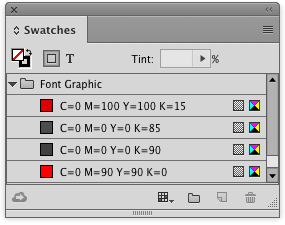
Creating color groups is a great way to keep the colors in your InDesign Swatches panel organized. You can create color groups by selecting the swatches you want, and clicking the New Color Group button at the bottom of the Swatches panel.
But did you ever notice that in the New Color Group dialog box there is another option to create a color group from the selected items in your layout? Try it sometime!

This article was last modified on January 12, 2026
This article was first published on July 26, 2016
Commenting is easier and faster when you're logged in!

Recommended for you
Hidden Type Treasures
In a recent blog post, Jonathan Hoefler and Tobias Frere-Jones revealed, “...

Q&A from the InCopy Tips Webinar, Part 2
Picking up where I left off, here are some more great questions (and my answers)...

7 Key Color Considerations for Logo Design
We humans are surrounded by colors. Our brains are evolved to understand things...