



James wrote:
So I managed to persuade the boss to buy me CS3 design standard… a few changes here and there — all together fantastic! But where do find the little shortcut icon that used to bring up the ‘Text Frame Options’ dialogue box!? It’s things like that that really get my goat!
James, it took me a while to figure out what you were talking about, but then it clicked: The PageMaker Toolbar! In CS2, you could open this toolbar by choosing it from the Window menu. In CS3, they not only hid it inside the Window > Object & Layout submenu, but they changed it’s name: It’s now called the Command Bar. Why? Just to keep you on your toes.
For anyone who hasn’t used the Command Bar: It can be helpful if you don’t like trying to remember keyboard shortcuts. (James, the shortcut is Command-B/Ctrl+B.) But it also has a couple of features that you can’t find elsewhere in the program, such as Open Photoshop, Open Acrobat, Increase Left Indent, and Decrease Left Indent.
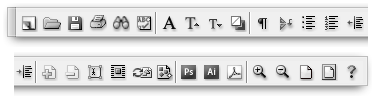
But the strangest “feature” in CS3’s Control Bar is that it lacks a close button! Grrr… the only way to close it is by choosing the menu item again.
Many people have suggested simply getting rid of this whole palette. My feeling is that Adobe should keep it in CS4… if, and only if, they make it customizable! I want to be able to put any feature I want in there, including scripts, workspaces, and so on.
This article was last modified on December 18, 2021
This article was first published on May 16, 2007
Commenting is easier and faster when you're logged in!

Recommended for you

Joining Tables
Without a Join Tables command, what's a busy design/production pro to do? Follow...
Make One (or more) Round Corners on an InDesign Frame
James wrote: Is it possible to create a box (with a rule) and only round one of...
Adding Space Between Paragraphs, Not Lines
Michael wrote: I'm using the Baseline Grid to keep the lines aligned between ver...