


Photoshop How-to: Oo la la! Retouch Photos Like the French


Marie Laure Clec’h

To buy this book click here.
In its ads, Yves Rocher demands high-quality imagery that combines esthetics with instantly readable text. In this story, photo retoucher Cyril Bruneau describes how the photographer arranged and shot a still-life of semi-transparent and opaque containers, and how Cyril himself then retouched the image so it would meet Yves Rocher’s exacting standards.
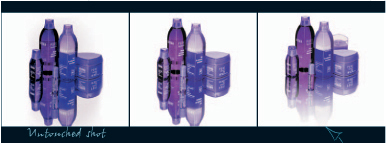
We’ve posted this excerpt as a PDF file. All you do is click the link “Photo Retouching With Photoshop” to open the PDF file in your Web browser. You can also download the PDF to your machine for later viewing.
To open the PDF, you’ll need a full version of Adobe Acrobat (5 or higher) or the Adobe Reader, which you can download here.
To learn how to configure your browser for viewing PDF files, see the Adobe Reader tech support page.
Excerpted from “Photo Retouching with Photoshop” by Marie Laure Clec’h. Copyright © 2004 O’Reilly. All rights reserved. Reproduced here by permission of the publisher.
This article was last modified on January 3, 2023
This article was first published on March 16, 2005
Commenting is easier and faster when you're logged in!

Recommended for you

How to Extract Images with Hair Using Photoshop’s Refine Mask
The following is an excerpt from Speaking Photoshop CS6 by Dave Bate. You can al...
Create Easy 3D Text Effects with Retrolift Photoshop Actions
I know that “flat design” is enjoying its 15 minutes of fame right now, but some...
CreativePro Tip of the Week: Make Illustrator Do the Math for You
This CreativePro Tip of the Week on making Illustrator do the math for you was s...