




Ever wish you could partially undo a change you made to an image in Photoshop? You can, with the help of the Fade command. Immediately after applying a filter or adjustment,

choose Edit > Fade (or press Command+Shift+F on Mac or Ctrl+Shift+F on Windows).
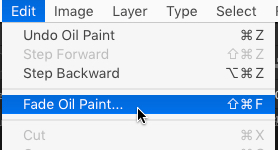
It’s like having an Undo slider, with an Opacity slider and Blend Mode menu.

This article was last modified on June 18, 2018
This article was first published on June 18, 2018
Commenting is easier and faster when you're logged in!

Recommended for you
How to Make a Cinemagraph in Photoshop
Cinemagraphs are images in which just a portion is animated on an endless loop....

Using Color Fonts in Photoshop with Fontself
Color fonts have been touted as the Next Big Thing. They aren’t universall...

Designing with Water Splashes in Photoshop
You may have seen images that look like they’re made made of dynamic, flow...