




Using the color-picking and theme-creating tools available from Adobe and elsewhere is often the quickest approach to building a project color palette. But sometimes you might want a low-tech, tactile solution instead. The 2016 Color Swatch Calendar by designer Peter von Freyhold is a great for picking and creating color themes, with the added bonus of being a weekly view calendar.
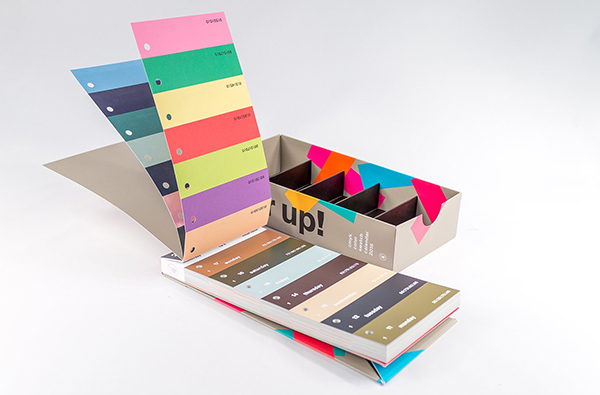
Part tear-off timekeeper, part weekly planner, part theme-builder this 2016 calendar features 371 individual colors. The individual color stubs are printed with the week number, date, day of the week, and the CMYK values for the color used on the tab. The color—and its values—are also printed on the reverse side. The full week display represents a co-ordinated color theme which will blend into the next week’s as the day tabs are pulled away. The Color Swatch Calendar comes packaged in an organizational box for sorting the color strips. The set also includes binding screws for you to easily create and keep color combinations together for future use.

This article was last modified on September 17, 2015
This article was first published on September 17, 2015
Commenting is easier and faster when you're logged in!

Recommended for you

Scanning Around With Gene: Mexican Flea Market Art
[Editor’s note: Just hours after this blog post was published, several sha...

dot-font: Where Type Designs Come From
dot-font was a collection of short articles written by editor and typographer Jo...
What Kind of InDesign User Are You? (Quiz)
Answer the questions, tally your points, and discover your InDesign persona...