




When you print a page that is smaller than the paper on which you’re printing, InDesign gives you very little to indicate the page boundary. You could turn on crop marks in the Marks and Bleed pane of the Print dialog box, but that still won’t provide a clear edge from corner to corner. Many a designer has been reduced to drawing (yes, with a pen and ruler!) lines around the page before showing a design to a client.
Don’t go there. Don’t pick up a pen. It’s too much work! You can be lazier than that. Instead, you can use one of a couple techniques.
First, you could place a stroked frame on your master pages the same size as your page. That works reasonably well, and you can even put the frame on a layer so it’s easy to show or hide. InDesign makes building a page-sized frame quite easy because the edge of a page acts like a guide — that is, as long as Snap to Guides is enabled, dragging near the edge will snap to it.
The second method is even easier, though you need to download something to get it. The (free) PageFrame script from Badia Software, to be exact. Badia has made wonderful XTensions for QuarkXPress for years, and it’s great to see that they’re turning their attention at last to InDesign users.
Obviously, they’re releasing PageFrame free because they want you to also learn about their other cool (but commercial) plug-ins, such as Exportools and OpenNow Pro.
PageFrame seems like a plug-in, but it’s actually a script. After you install it (it has a simple installer) and re-launch InDesign, you’ll find a “Print with Frame” feature at the bottom of the File menu. The feature is a bit clunky, in my opinion. I wish this were a plug-in that would just add a “print frame” option in the Print dialog box. But no, it actually launches a little application that places a frame on every page (just as though you did it manually).
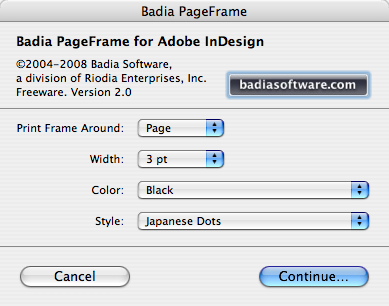
Then it opens the Print dialog box. When it’s done printing, it reverts back to the state it was in before it added the frames. It’s easy, but not as fun as if the feature were truly built-in.
This article was last modified on December 18, 2021
This article was first published on April 15, 2008
Commenting is easier and faster when you're logged in!

Recommended for you

MoreInfo Improves Notes, Conditional Text, Tracked Changes and More
MoreInfo is a plug-in by Kerntiff Systems that combines information from several...

Xaos Tools: Total Xaos
(C|Net Builder.com) – Total Xaos bundles together three powerful plug-ins...

New Features in July 2024 Release of Photoshop
Photoshop has two new tools: the Selection Brush and Adjustment Brush, plus enha...