


A Script to Display InDesign Documents at Actual Size
Script makes Actual Size on screen match actual size in the real world, even if you've scaled the user interface
Oops, you’re not logged in!
Log in or sign up for a free account.


Working in InDesign on a high-resolution monitor, 4K or higher? If you’ve set User Interface Scaling in InDesign on Mac to, say, 150%, or System > Display > Scale on Windows to, say, 200%, to suit your viewing needs, try this: draw a 3″ × 2″ box, hit Cmd+1(Mac) / Ctrl+1(Win) to view at 100% zoom, and hold a Physical Ruler against your screen. The measurements won’t match.
The script Display Print Size at 100% Zoom fixes that. Drop this lightweight startup script into your startup scripts folder and tell it about your setup once. From then on, Actual (Print) Size really means actual size: 3 inches on screen equals 3 inches on the physical ruler, for every object.
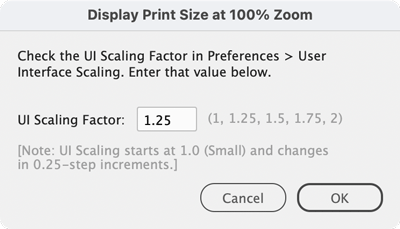
On Mac: if you have set Preferences > User Interface Scaling to, say, 150% (it starts at 100% for Small and increments in 0.25 steps, so 150% means 1.5), skip InDesign’s restart prompt (click Later). Choose View > Set Print Size Scaling…, enter the same UI Scaling factor (1.5), and click Relaunch Now. One restart covers both.
On Windows: choose View > Set Print Size Scaling…, enter your screen’s diagonal size and its Display resolution from Windows Settings (for example 27″ and 3840 × 2160), and click Relaunch Now. Note: Windows Display Scale and InDesign’s UI Scaling factor do not matter here.
Your settings are saved for future launches.
Downloading the Script
Be sure you are logged in, then click the green Download Now button at the top of this page.
Installation
Where to put the script (example):
Mac: /Applications/Adobe InDesign 2026/Scripts/startup scripts
Win: C:\Program Files\Adobe InDesign 2026\Scripts\startup scripts
This article was last modified on October 11, 2026
This article was first published on October 11, 2026
Commenting is easier and faster when you're logged in!

Recommended for you

Adding and Deleting Notes: Managing Cross-References
Several scripts described on these pages make use of cross-referencing for their...
Index: Number Style Overrides in Books
Number style overrides are ignored when an index is generated in a separate docu...
Index: Ignore Insignificant Words
An index should be sorted while ignoring insignificant words, such as (in Englis...