


Font Substitution
A script to automate font substitution.
Oops, you’re not logged in!
Log in or sign up for a free account.


These scripts are part of the Output and Prepress Tools collection. See the full collection here.
Often, when you open a file that you received from someone else, one or more of the fonts used in that file are reported as missing. You can fix that in InDesign. Or when you upgrade old files you may want or need to change fonts. To replace missing fonts with fonts that you have on your system you can use InDesign’s Find/Replace Font feature, but that’s really any good only for occasional use; replacing fonts in lots of documents, or replacing fonts routinely in files from a certain source, soon gets tedious.
The first attached script (font-substitution.jsx) can be used to replace fonts in a document. The script uses a text file that lists the fonts to be replaced. The text file has document and replacement fonts on one line, separated by a tab. Font names and styles too are separated by tabs. For instance, the following line is used to replace all instances of Optima Regular with Optima LT Pro Regular:
Optima[tab]Regular[tab]Optima LT Pro[tab]RegularThe text file must be named font-substitution.txt and should be placed in the script’s folder. You can create it in a text editor, but you can also use a separate script to create the text file; see below.
The font names must be entered exactly as InDesign shows them in various panels, including capitalisation. The script replaces fonts in character styles, paragraph styles, and instances of local overrides.
Note: The replacement fonts should be installed in the OS’s Fonts folder (C:\Windows\Fonts\ on Windows) or in InDesign’s Fonts folder. Fonts in a Document Fonts folder can’t be used as replacement fonts.
The script checks whether the replacement fonts exist and shows any missing replacement fonts. You can opt to continue or to quit and fix the text file if you made typo.
To avoid problems with naming fonts and styles and to make sure that a replacement font exists you can use the tool described in the next section.
A tool for creating the text file
The text file used by the script can be created manually, as described above, but also by a separate script (font-substitution-create-table.jsx) on the basis of an InDesign document. To use the script, open a document that contains missing fonts and run the script. It shows a window that lists the missing fonts:
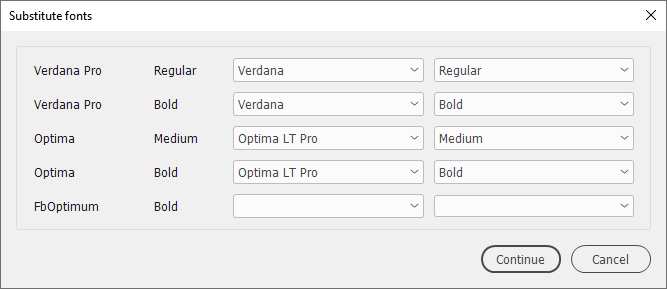
The missing fonts are printed on the left and can’t be changed. Columns 3 and 4 are used for the replacement fonts. The script tries to match a missing font with a font on your system. For instance, the open document in this example lacks Verdana Pro Regular, but the script found Verdana Regular and suggests that as the replacement font. You can use the drop-downs to make any changes or supply a name and style if the script didn’t find any close match.
When you’re done, click Continue. The script now shows the lines for the font-substitution table:
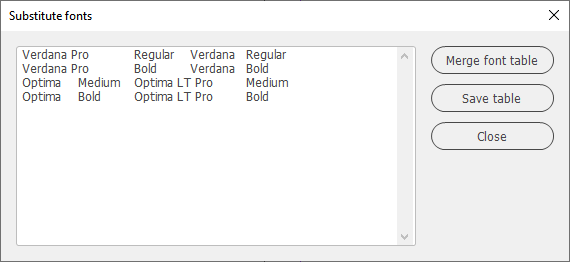
Click Save table to save the table. You can’t supply a name, it must be font-substitution.txt
If you have an existing text file and want to combine the new items and the existing table, click Merge font table (the button is greyed out if the text file doesn’t exist). The merged items are shown with the entries sorted and duplicates removed. Click Save table to store the merged table.
Known problem
Sometimes one or more fonts aren’t substituted. I’ve no idea why that is the case.
Version history
12 Oct. 2023: The script now catches more instances of missing fonts. Previously, empty paragraphs and empty frames weren’t found. There can still be instances that aren’t found, but their number should be reduced by now. In addition, the table maker now recognises Type 1 fonts better than before.
31 Dec. 2022: First posted.
Peter Kahrel Script Repository
Hosted as a community service, and with deep appreciation, by CreativePro.com
Scripts by Topic | Script Index
Basic Script Installation and Use
How to Modify or Configure These Scripts
Resources for Scripting and Publishing Automation
About This Repository
Contact Peter Kahrel
Note to users: You run scripts at your own risk: CreativePro and the author accept no liability for anything that may be caused by any of these scripts. Always take the necessary precautions. We encourage you to save backups and test scripts on copies of your documents.
This article was last modified on September 30, 2026
This article was first published on January 29, 2026
Commenting is easier and faster when you're logged in!

Recommended for you
CreativePro Video: Small Format Presentations
In this week’s CreativePro video, Joe Buchwald, Creative Director for the Adobe...
InDesign GREP Essentials: What GREP Is and What It Does
Part 1 in a series of posts on using GREP in InDesign for beginners GREP is scar...
Remove Imported-Style Symbols
When you place a Word file in InDesign, all styles have a symbol to indicate tha...