


Set Quickmark
Leave a bookmark at the cursor position, go somewhere else in your document, and fly back to your bookmark later.
Oops, you’re not logged in!
Log in or sign up for a free account.


These scripts are part of the Type and Text collection. See the full collection here.
This script is part of the Book and Long Document Composition/Production collection. See the full collection here.
You’re working in a document and want to check something somewhere else in the document, then return to where you came from. You can do this with the scripts described here.
To set a quickmark somewhere, select an insertion point and run the quickmark_set.jsx script. When you want to return to this point later on, run the quickmark_goto.jsx script. That’s all there’s to it. Ideally, the scripts are assigned to keyboard shortcuts in the Keyboard Shortcuts editor.
The quickmark doesn’t have to be in the active document. When you go to the quickmark, the script first checks the active document, then, if there are any, all other open documents.
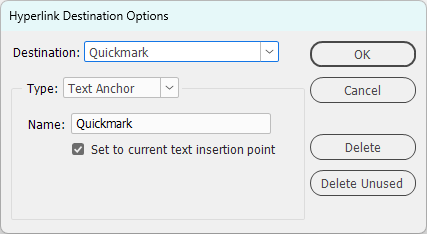
Note: The scripts use a text anchor (a.k.a. Hyperlink Destination), not a bookmark. An earlier version of the scripts did use a bookmark, but the trouble with bookmarks is that they appear in the bookmark table of contents when the document is exported to PDF. The anchor is named Quickmark.
You can leave the quickmark, where it is, it doesn’t interfere with anything. But if you do want to delete it, open the Hyperlinks panel (Window > Interactive > Hyperlinks) and select Hyperlink Destination Options from the hamburger menu. Find the quickmark in the Destination dropdown and delete it.
Peter Kahrel Script Repository
Hosted as a community service, and with deep appreciation, by CreativePro.com
Scripts by Topic | Script Index
Basic Script Installation and Use
How to Modify or Configure These Scripts
Resources for Scripting and Publishing Automation
About This Repository
Contact Peter Kahrel
Note to users: You run scripts at your own risk: CreativePro and the author accept no liability for anything that may be caused by any of these scripts. Always take the necessary precautions. We encourage you to save backups and test scripts on copies of your documents.
This article was last modified on September 22, 2026
This article was first published on August 3, 2025
Commenting is easier and faster when you're logged in!

Recommended for you
Adobe Certified Professional Exam Prep Guides
Use these self-assessment guides to determine what you should study to pass the...
Index Fixes: Multiple Indexes in an InDesign Document
InDesign documents can contain only one index. But when you need more than one i...