




This content is courtesy of The Russell Brown Show.
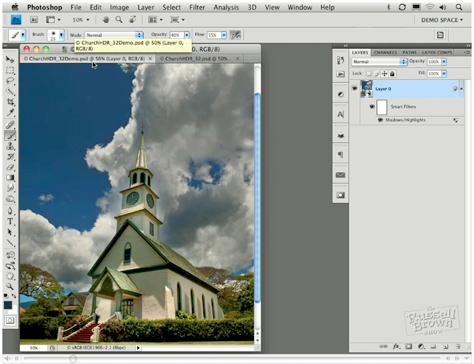
In this tutorial, I begin with the Merge to HDR command in Adobe Photoshop CS4 Extended. I use it to combine seven photos shot one stop apart. The resulting high dynamic range (HDR) image looks OK, but I think it could be better:

And in fact, I make it a lot better, painting in exposure to recover information in the clouds, converting it to a Smart Object, and more.
Learn how you can do the same with your photos by watching the video below:
This article was last modified on January 5, 2023
This article was first published on March 25, 2010
Commenting is easier and faster when you're logged in!

Recommended for you
Essential Tips for Cropping Images in Photoshop
Whether it’s done to make images fit a specific space, or to make them tell a ce...
Essential Tips for Working with Photoshop Masks
These quick tips will come in handy whenever you need to hide content on a layer...

Scanning Around with Gene: Barbecues, Bar-B-Ques, or BBQs — We Love 'Em All
The New York Times recently ran an article called “Pimp My Grill” ab...