




Rorohiko’s new FrameReporter plug-in gives you all the info you need, right at your fingertips. One click shows you image paths, names, and effective resolution; number of words in a frame or story; and which items are overridden from master pages. It even lets you jump to certain stories and frames. Never waste time digging through InDesign palettes again!
To get your free FrameReporter software, click HERE and enter the coupon code NOTES. You’ll pay just $49 for a two-year subscription to InDesign Magazine (and all 31 back issues). We’ll then immediately send you a message with FrameReporter download information.
This offer expires on November 30, 2009, so don’t wait—subscribe to InDesign Magazine now!
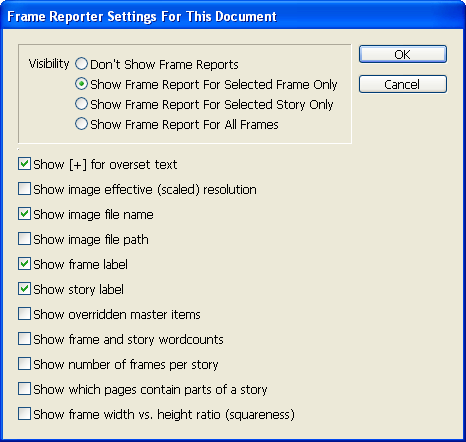
The FrameReporter preferences dialog shows its available options:
Find more about FrameReporter here.
This article was last modified on December 14, 2022
This article was first published on November 24, 2009
Commenting is easier and faster when you're logged in!

Recommended for you

InDesign How-to Video: How to Automate Story Jumps
In this week’s InDesignSecrets video, Erica Gamet shows how to automate story ju...

Before&After Design Tip: Good Design Must Have a Focal Point
Learn how to create a focal point that will give your design holding power.

Generative AI for Digital Artists: Miracle Cure or Poisoned Chalice?
Generative AI has come a long way in a short time, but what does it mean for som...