




This article courtesy of Design Tools Monthly. For a free sample of the printed newsletter, email in**@**********ls.com.
Realistic Surfaces and Textures
Human Software’s PhotoSurface 3.0 ($70) is a plug-in for Photoshop 7, CS, and CS2 that creates more than 300 realistic textures and surfaces, including metal, wood, masonry, fabrics, carpet, and many kinds of leather. It can also distress an image. The company’s Web site shows examples of many of the effects.
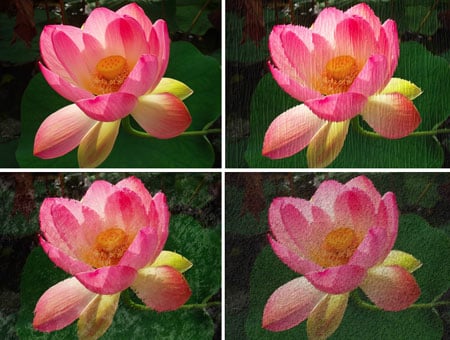
With PhotoSurface 3.0, you can take an original image (top left) and apply such effects as Straw (top right), Watery (bottom left) and the oddly named Toad skin (bottom right).
Intuitive Color Correction
PhotoTune’s 20/20 Color MD ($50) is a remarkably easy to use color-correction plug-in for Photoshop. To use 20/20 Color MD, you look at a series of side-by-side images, each time clicking on the one you think looks best. After you complete this 15-second process, the plug-in applies the minimum number of adjustments to make your image look like your final choice. Professionals can use the advanced controls to adjust exposure in half f-stops and to separately balance color in highlights and shadows. You can also save “snapshots” of your adjustments at any point in the process.
Faster Photoshop Masking
Vertus’ Fluid Mask ($399) is a plug-in that helps you mask images in Photoshop. Vertus says that, when used on difficult images, the masking process is three to six times faster using its plug-in than other products because it mimics the way the eye and brain recognize complex shapes and colors in images. To test these claims for yourself, download the free trial version.
MUCH Better Printing from QuarkXPress
Badia Software’s Printools ($100) is an XTension for QuarkXPress 4, 5, and 6 that adds many new features to your printing process. Version 6 (for QuarkXPress 6) adds Rename at Print, which can automatically rename files at print time using any combination of the project or layout names, serial numbers, page range, or other custom text. A live preview window shows how your document will print, including paper boundaries. You can print just part of a page by dragging your mouse over an area or item(s) in the preview. The XTension can add a temporary page border and page slugs listing owner name, machine name, bleed, scaling, line screen, and emulsion.
Printools shows spreads, crop marks, registration marks, registration offset, calibration bars, page slug, bleed, page sequence, back-to-front printing, print as thumbnails, page orientation, page positioning, scaling, color, gray or black-and-white printing, page gap, page flipping, negative printing, manual tiling, auto tiling and auto tiling overlaps. Printools can also warn you when the document size is larger than the paper in the printer or imagesetter. It can preflight a document to detect RGB images, text overflows, missing fonts and low-resolution pictures. You can set the XTension to automatically check every document before it prints. You can batch print multiple documents using the same output settings. You can save and redefine print styles, output several usage reports including style sheets, and track revisions and editing time.
Embed Fonts in PostScript or EPS Files
Callas Software’s $249 FontIncluder 2/XT is an XTension for QuarkXPress 4, 5, and 6 (Macintosh and Windows) that lets you embed fonts into exported EPS, PostScript, and DCS files. You can place and print the resulting files with font information maintained. FontIncluder2/XT also works as a standalone application, embedding fonts into any EPS, PostScript, or DCS file you drop onto it.
Control iTunes from InDesign
Knowbody’s TuneIT is a free plug-in for InDesign that lets you control iTunes from a palette in InDesign. You can choose playlists and tracks, go to previous and next track, play/pause, and repeat or shuffle. You can also assign keyboard shortcuts to all of the commands. (Useful? Maybe. Cool? Definitely.)
Time Stamp for InDesign
Knowbody’s Stamp It ($50/yr) is a plug-in for InDesign that adds time stamps to your document. The plug-in can automatically update stamps with either the name of the last person who saved the it, or a complete log of all the users who have saved it. It can also display the date and time of the last save and a list of fonts used.
Keep Font Attributes When Pasting in InDesign
Knowbody’s Smart Paste ($50/yr) is a plugin for InDesign that lets you paste text from another application (such as Microsoft Word) and keep any of several font attributes, including size, underline, font family, and font style. That way, you can assign a paragraph style in InDesign, then paste the text while maintaining any or all of the text’s original formatting.
Save InDesign Pages as TIFF
Triple Triangle’s Raster Write ($169) is a plug-in for InDesign CS and CS2 that lets you export pages or portions of a page in such raster formats as TIFF, JPEG and GIF, with control over color mode (RGB or CMYK), resolution, and scale. Raster Write can export ranges of pages or spreads into one image or multiple images, and can automatically save a raster version of a document whenever you save the document.
Impose Pages in Acrobat
The $400 Imposer Pro 1.0 from alap is a plug-in for Adobe Acrobat 6 and 7 that imposes pages for printing, from 2-up printer spreads to 8-up printer flats, multi-page signatures, multiple sheets, with support for split web, sheet wise, and multiple unit printing. The plug-in creates a new PDF file containing the imposed pages, which lets you preview the imposition on-screen before printing.
This article courtesy of and copyrighted by Design Tools Monthly. For a free sample of the printed newsletter, email in**@**********ls.com.
This article was last modified on December 14, 2022
This article was first published on September 2, 2005
Commenting is easier and faster when you're logged in!

Recommended for you

How to Extract Images Using Photoshop’s Refine Mask
Splitting Hairs with Refine Mask We can only accomplish so much using manual mas...

Heavy Metal Madness: The Art of Labor Day, or is it Leisure Day?
I enjoy a three-day weekend as much as anybody, but Labor Day has always struck...
Accelerate Graphics Production Using Metadata Filters in Adobe Bridge and Lightroom
You’ve got a folder full of images and you need to run some production chores on...