




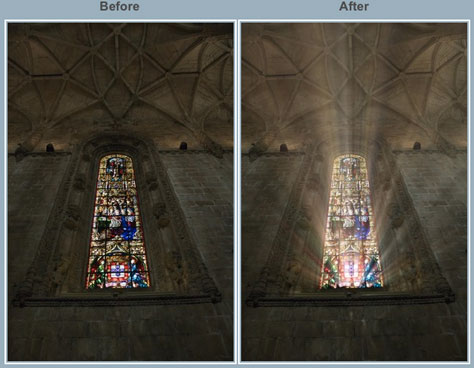
A relatively new plug-in from Digital Film Tools gives you the ability to add customized rays of light to a photo. Once you install the plug-in, you can access its interface from within Adobe Photoshop, Adobe Lightroom, or Apple Aperture, to control ray length, brightness, direction, and color.
In addition to inserting realistic rays of light into a scene where they might really occur, you can also use Rays to create dramatic text effects:

When the print or Web project you’re working on calls for a photo or text with high drama, Rays may be the right tool for the job.
Rays costs $50.
This article was last modified on December 14, 2022
This article was first published on May 9, 2011
Commenting is easier and faster when you're logged in!

Recommended for you

Scanning Around with Gene: The Joke's on You
Before Hollywood brats got “Punk’d,” and before political oppo...
How to Make a Rubber Stamp Effect in Photoshop
You can turn just about any artwork, logo, or text into a rubber stamp by follow...
How to Perceive Brightness More Accurately
Learn how to control the key factors that can affect how you perceive brightness...