



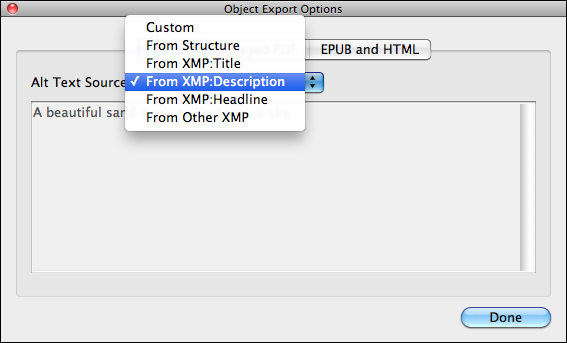
InDesign CS5.5’s new Object Export Options (found in the Object menu) is a treasure trove of features. One of these is the ability to override InDesign’s default tendency to use an image’s name as its ALT tag, and instead use custom information you’ve entered for the image’s XMP metadata, when you export the document to EPUB or HTML. (Descriptive ALT tags in EPUBs and web sites are important for accessibility, and have other uses. More info on ALT tags here.)
Here’s the default way InDesign links to an image named “06523.jpeg” in an EPUB or HTML file:
<img width="600" height="600" src="images/06523_fmt.jpeg" alt="06523.jpeg"/>
After you use Object Export Options to pull more descriptive text from the image’s XMP data (similar to how Live Captions works), the link might look like this:
<img width="600" height="600" src="images/06523_fmt.jpeg" alt="Chicago's
Bike the Drive lets 20,000 bike riders enjoy full access to 20 miles
of Lake Shore Drive once a year."/>
The problem is that in this interim CS5.5 release, yes we have an easy and convenient way to add a better ALT tag (thank you Adobe!), but there is no way to use it other than manually applying it to each selected image object, one by one:
- Select the image.
- Choose Object > Object Export Options.
- Select the ALT tab. The default option is “From Structure” (which in practice means “use filename”).
- Choose a different source for the ALT tag from the dropdown menu
- Click the Done button.
- Rinse and repeat for the other images in the file.
Confronted with an EPUB project where I’d need to do this dozens, perhaps hundreds of times, I asked one of our friendly InDesign scripting gurus, Marijan Tompa (@tomaxxi), how difficult it would be to come up with a script that would let the user apply the XMP Description metadata to all the images in the active document at once. Since the XMP Description field is commonly used to hold image captions, I thought that would be one I’d use most often.
Batch-apply ALT tags with ApplyALTfromXMP.jsx script
To my delight, Marijan emailed me a simple Javascript within the hour, and it worked a treat. Of course I had a few more “gee it would be great if it could also’s” :D including the ability to choose other kinds of XMP metadata, a way to prevent it from overwriting existing custom ALT tags, and a dialog box at the end that showed a count of how many images it worked on.
Another hour later and an updated version of the ApplyALTfromXMP.jsx script arrived in my mailbox. Plus, he added a friendly link back to our site!

Since this is a Javascript, it will work on both Mac and Windows platforms. It requires InDesign CS5.5 (the feature it automates doesn’t exist in previous versions).
Click to download ApplyALTfromXMP.zip, then unzip the file and put the ApplyALTfromXMP.jsx file in your scripts folder. (Here are some instructions if you’ve never installed a script before.)
Thank you Marijan! Be sure to check out his site, https://tomaxxi.com/, and if you’re on Twitter, you can follow him at @tomaxxi.
This article was last modified on December 21, 2021
This article was first published on July 12, 2011
Commenting is easier and faster when you're logged in!

Recommended for you

This Week in InDesign Articles, Number 40
More articles, more tips, more videos, more InDesign goodness!

Accessible EPUB Export from InDesign Gets an Upgrade
Recent improvements in InDesign EPUB export bring the dream of "born accessible"...
This Week in InDesign Articles, Number 24
Feeling underinformed? There's a fix for that! Read these great articles, watch...