




Q. Is there a quick, easy way to format fractions when you’re using fonts that aren’t OpenType?
A. QuarkXPress has a Make Fraction feature for any font format (Style > Type Style > Make Fraction), but when I was first asked this question in 2007 (“Faking It With Fractions”), InDesign users had to build fractions manually. That’s time-consuming at best and unrealistic for a lengthy project with numerous fractions, such as a cookbook.
However, I’ve since discovered a nifty InDesign Script called Proper Fraction 2.0, created by Dan Rodney. It comes in two flavors: The Free version and Proper Fraction Pro ($75). Both are extremely easy to install and use.
The Free version automatically formats a selected fraction in any font format by scaling down the numerator and denominator, and inserting a proper fraction bar (sometimes referred to as a virgule). The downside of this free version is that the scaled-down fraction characters typically appear lighter than surrounding characters, and they can have uneven spacing between the glyphs.
Select the fraction…

Double-click on the Script in the Scripts panel…

…and voila!
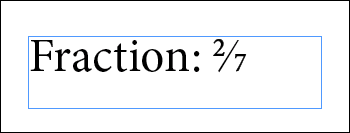
If your work includes a lot of fractions, or you’re a stickler for professional-looking typography, you might want to spring for the more advanced Pro version. Proper Fraction Pro strokes the numerator and denominator for a more balanced thickness and better-looking fraction. It also includes the ability to custom-kern the space before and after your choice of numerals before and after the fraction bar. And last but not least, the Pro version can automatically format all fractions in an entire document, story or selection. Even if you have 4,000 fractions in a 300-page book, this script will convert them all in minutes.
To format multiple fractions, double-click the Format Multiple Fractions script in the Scripts panel.
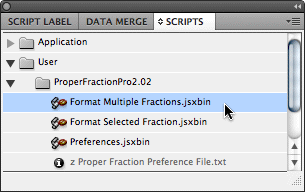
Select the scope of the search and click OK.
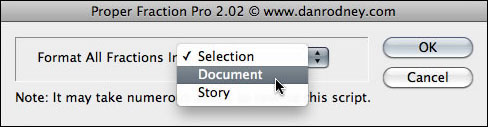
Proper Fraction Pro has a robust set of preferences where you can kern numerals to the slash.

Both the Free and Pro versions are compatible with Mac and Windows, and both support InDesign CS2 through CS5.
For a deep dive into the fractions pool, see Jim Felici’s “Fractional Improvements” article.
This article was last modified on May 29, 2023
This article was first published on September 29, 2010
Commenting is easier and faster when you're logged in!

Recommended for you

Fresh Fonts: Introducing DIN Next Slab
With scores of new typeface designs being released all the time, it is difficult...
Before&After: What’s the Right Typeface for Text?
Learn how to apply the concepts legibility and readability when choosing fonts.
Marrying Types: Sans on Sans
Finding typefaces that work well together can be tricky. There are no mix-and-ma...