



Have you ever needed to break the news to a kid that there is no Santa Claus? Seen the tears well up in their big brown eyes? You can relive that unique experience with new InDesign users. Just ask them to select some text, and then go to the Language menu (in the Control or Character panel) and click.

When the dropdown menu of over thirty languages appears – French, Spanish, Norwegian, five flavors of German, exotic Finnish and Turkish – shush! Don’t say anything for a moment. Just watch their faces as the wheels turn. You can almost hear their hearts racing … they’re thinking, “WHAT- InDesign can translate text to all these languages-!?! Why isn’t this in the product brochure?”
Now don’t wait too long to break the bad news to them, that would be cruel. Before they utter a word you must jump in with, “No, no, it doesn’t translate, choosing a language here just associates the text selection with that language’s spelling and hyphenation dictionary. You use it on text that’s already been set in a foreign language.”
Oh. Of course, yes, that’s useful too. Nice feature. Then, usually, an embarrassed little chuckle. They almost believed in Santa Claus for a moment there. Very funny.
But it Does Do a Little Translation
InDesign’s software engineers actually did build a limited translation function into CS3. One where selecting text and changing the language dictionary in the dropdown menu does what every little InDesign-using boy and girl has always dreamed: translates the selection to that language.
You’ll find it in the Type > Text Variables area, specifically, the Creation Date and Modification Date variables. These are great for inserting into text frames in footers or slugs, when you want a date stamp that automatically updates to show when a layout was created or when it was last modified.

Insert one of these variables into your text flow, then drag over the variable to select it (it acts like a single, inline anchored object) and change the language dictionary from the dropdown menu.
Here’s a Creation Date variable showing today’s date in my default language, US-English. (I’ve edited the default variable a bit in Type > Variables > Define, and added the “era” to it, which always cracks me up.)

I selected the variable in the frame and chose Italian from the Language dropdown menu. Osservi, il Osserva, mio caro:

Apparently you don’t capitalize days and months in Italian? I wouldn’t know. Here it is in German, Norwegian and Turkish:
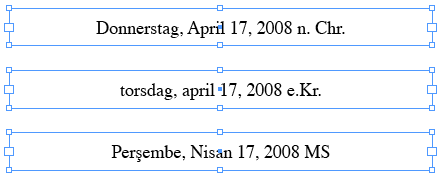
Whoa, right? Can you hear the sleigh bells?
This article was last modified on December 18, 2021
This article was first published on April 17, 2008
Commenting is easier and faster when you're logged in!

Recommended for you

Setting up Numbered Lists that Jump Frames in CS3
Most people, I think, can figure out the basics of InDesign’s Numbered Lis...
Changes in the Undo string
One of the more controversial changes in ID CS3 has to do with how the Undo comm...
Add More Images to your Multiplace Queue
Have you ever wanted to place multiple files from more than one folder at a time...