



First things first…if you’re not using Windows 7 you can just ignore this post. But if you’re looking for little reasons to upgrade from XP or Vista, then continue on.
Okay, now that everyone else has left the room, I wanted to bring a nice little Windows 7 feature to your attention. The new task bar in Window 7 allows you to pin an application to it. While that’s nothing new(earlier versions of Windows had a quick launch area) , what is new that these aren’t just dumb icons. Microsoft added a very nice feature here–right click on the icon and you’ll see all of your recent files.
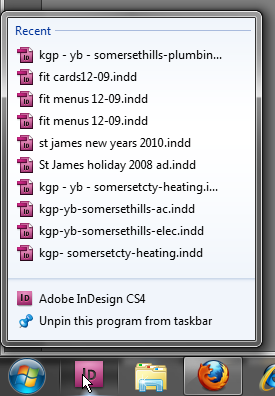
InDesign CS4 pinned to Windows 7 task bar
While some people may not think this is a big deal, but I’ve seen some very weird behavior with InDesign’s welcome screen list and open recent command. There’s also been quite a few complaints about it in various user forums. There’s one discussion going on right now in Adobe’s User to User Forum.
Some of the flaky behavior that I’ve seen reported or experienced:
- InDesign includes the sample button library
- The first item on the list in the welcome screen doesn’t always work
- Any time a plugin is installed the list is cleared
- There have been some reports of the list being unavailable when using the TweakUI Windows add in.
All of that is eliminated because in this case, it’s the operating system keeping track. As an added bonus, you don’t even need to launch InDesign to see the list.
This article was last modified on December 20, 2021
This article was first published on January 7, 2010
Commenting is easier and faster when you're logged in!

Recommended for you

60 Minutes…
An answer to the question: How do I create dots for all the minutes on a clock f...
Moving Pages to Another Document Doesn’t Have to be a Drag.
For the longest time moving pages from one document to another was an exercise i...
Customizing a Preflight Profile
The key to making Live Preflight useful for your production workflow is to creat...