



Last updated July 19, 2006
In its quest for faster hardware, Apple has abandoned the PowerPC processor and embraced Intel’s Core Duo chip. Intel-based Macs are shipping now, and Apple promises that every new Mac will use only Intel chips.
Faster hardware is good, but only if your software is compatible. To decipher whether your key applications are Intel-savvy, you need to understand two terms: Rosetta and Universal.
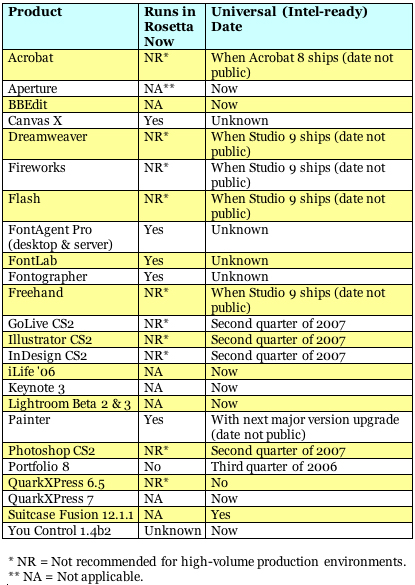
Rosetta is part of the Intel version of Mac OS X, and it translates code written to run on a PowerPC processor into a form that Intel processors can use. Theoretically, that means that, thanks to Rosetta, any program written for the PowerPC can run on an Intel Mac. However, some processor-intensive programs may run too slowly under Rosetta to be practical in a high-volume production environment.
Universal is a code word for software programs that run natively on both PowerPC- and Intel-based Macs. Because Rosetta’s translation isn’t necessary, there should be no speed hit. In fact, if the Universal version of a program is written to take advantage of Intel’s Core Duo chip, the Universal version may be significantly faster than the PowerPC version of the program running on a PowerPC Mac.
The following list tracks major tools that print and Web designers and photographers rely on.
This article was last modified on March 29, 2022
This article was first published on March 3, 2006
Commenting is easier and faster when you're logged in!

Recommended for you

Reducing the total ink limit in CMYK images using Photoshop
Having too much total ink in your CMYK document is a pretty common problem. Sure...

How to Adjust Colors in Photoshop Using Hue and Saturation
Learn how to manipulate an image’s colors using Photoshop’s Hue and Saturation s...

Photoshop 10 Essential Tips: Working with Layers
Photoshop users have been enjoying the ability to shuffle around layers since ve...