




I was working on the following paragraph today:

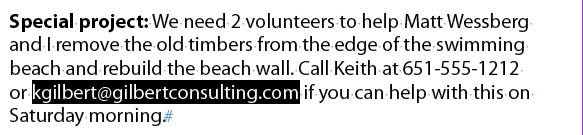
I wanted to keep my email address (highlighted in black above) together on one line. There are two common ways to accomplish this. Most people would just put a line break character (shift-return) before the email address, forcing it to the next line, like so:
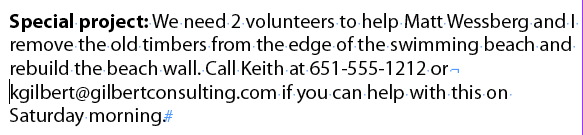
The trouble is, this results in a really ugly rag on the right side of the paragraph, which I would need to fix by inserting more line breaks. But there’s a better way.
If I select the email address and choose No Break from the Control panel menu, the Paragraph Composer recalculates every possible combination of line endings, taking the No Break attribute into consideration, and comes up with the most even rag possible. Much better!
A couple of related items:
One problem with using the No Break attribute is that there is no easy way to see where it has been applied. This free script by Peter Kahrel solves the problem.
If you want to keep a multiple words together, instead of selecting the words and applying the No Break attribute, another method is to replace the spaces between the words with non-breaking spaces (command-option-x [Mac], ctrl-alt-x [Windows]). The advantage to this method is that the non-breaking spaces are visible as something other than a regular space when you choose Type > Show Hidden Characters. The trouble is, the Paragraph Composer treats words containing non-breaking spaces differently than multiple words with No Break applied. So you will often get two different results, depending on which method you use. You’ll need to determine which method gives you the best results with the Paragraph Composer.
This article was last modified on August 2, 2022
This article was first published on May 2, 2012
Commenting is easier and faster when you're logged in!

Recommended for you

Using 3D in Affinity
Create rotatable 3D objects using Affinity and Canva AI with Steve Caplin.

Making Tables Accessible
Learn how to correctly tag complex PDF table headers for screen readers with Dax...

A Script for Styling Punctuation in InDesign
This free script formats punctuation to match the text immediately before and af...