




Alan wrote:
I use the Selection tool to select a text frame that has all one style, all one font size, etc., and open the Character panel. I can’t modify the font size or tracking using the up/down buttons, nor with the up/down arrow keys after clicking inside the field.
I love the ability to change the formatting inside one or more selected unthreaded text frames with the Selection tool. It just speeds things up so much. You can even apply paragraph styles, and so on.
Typically people use the Character panel for this because when you have the Selection tool chosen in the tool panel, the Control panel doesn’t show you text formatting. However, after you choose the frames, just press T to switch to the Type tool and the Control panel changes, offering you font, size, and so on.
But what you’re talking about is different; you’re talking about a situation where some text formatting is available, but some is not — the whole field is blank:
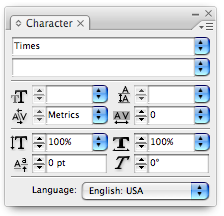
In the image above, you cannot change the text size, leading, or font style using the arrow keys on the keyboard or the arrow buttons next to the fields. Why? Because the text frame contains more than one size, leading, and font style. For example, if every character in the frame is Times Roman 11 pt with 13 pt leading, but one character — say an invisible final paragraph return — is Times Italic 12 on 14…? That would do it.
The Selection tool trick only works when every character in the frame is the same. You can, of course, still apply formatting manually — that is, you can choose from the pop-up menu next to the field or type in a value yourself. You just can’t adjust all the values up or down with the keys. (The same thing happens, of course, when you have a range of text selected with the Type tool, and that text contains different formatting.)
Personally, I think this is annoying and perhaps even a bug. (A bug in the programmers’ thinking, if nothing else.) After all, why shouldn’t you be able to increase or decrease the values of each and every character in the frame (or selection) by the same increment at the same time?
This article was last modified on December 19, 2021
This article was first published on November 7, 2008
Commenting is easier and faster when you're logged in!

Recommended for you

Comfy Camera Pillows
Etsy seller “intheseam” has created a fun line of pillows printed wi...

Update Acrobat & Adobe Reader to 9.4
The Adobe Reader and Acrobat 9.4 updates for Mac address critical security vulne...

Multi-Find/Change Is Now Free
An essential tool for processing text in InDesign is now available for free.