



A client e-mailed me recently:
I found myself frustrated with IDCS3 last night as I was working on a freelance project. This came from being convinced I have seen a better way to do something and not remembering how. It has to do with showing the name of the image in the cursor preview.
I have about 30 images loaded and some are similar. I recall there being some option or modifier that would show the name of the image in the cursor with the preview.
I hope you have an answer for this. It’s driving me crazy.
Sure — I think you’re remembering a feature of the Links panel. If the panel is open, it will show the file name of the image that you’re about to place, the one that’s loaded in your cursor. (This is not new — CS2 does the same thing.) If the panel’s not open, remember you can open it without losing the image loaded into the cursor.
What’s new in CS3 is this: When you have more than one image loaded, not only does the Links panel show all their file names, but the one you can see the preview for (the image “in front” that would be placed if you clicked) has a page number of “LP” in the Links panel. LP stands for Loaded Place [gun or cursor] depending on what part of Chicago you’re from.
All other images loaded in the cursor lack a page number — you only see their file names in the Links Panel, and the page number area is blank.
In the screen shot below, I’ve loaded four images into my cursor from the Place dialog box. I know the image I’m about to place is called “MantisEatMonarch_CMYK.psd” because it’s the one with the page number of LP in the Links panel.
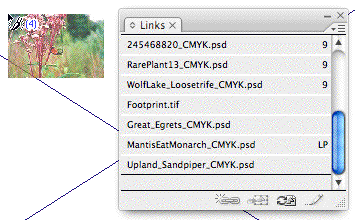
The file names of the other images loaded in the cursor appear without page numbers.
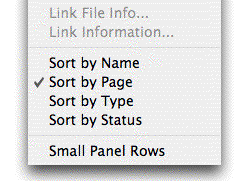
One tip is that InDesign will list loaded image file names according to the Links panel’s Sort order, which you can specify in the panel’s fly-out menu. If they’re sorted by Name, then the entries for the loaded images will be scattered throughout the panel, wherever they belong in the alphabetical order.
To get the filenames of my loaded images all grouped together as shown in the screen shot, I changed the Sort order to Page. That way, all of the file names appear at the end of the entries.
This article was last modified on December 18, 2021
This article was first published on October 31, 2007
Commenting is easier and faster when you're logged in!

Recommended for you

Stop Hyphenating Across Columns and Page Breaks
Luke wrote: I wondered if there was any way of stopping InDesign from hyphenatin...
Turning Polygons to Starbursts in InDesign
Drawing starbursts isn't hard, once you know where to look. Plus, check out this...
Scaling vs. Resizing in InDesign CS3
We've been getting a lot of questions from folks who?ve upgraded to CS3, asking...