



Chris wrote:
I’m hoping to add a keyboard shortcut for “Hide Master Page Items”, which is in the flyout menu on the Pages panel. Sadly, I haven’t been able to find “Hide Master Page Items” in the Shortcuts dialog box. Am I overlooking it?
This is a very common problem for people looking to add shortcuts to features in InDesign. In this case, I could just give you a fish (to feed you today) or teach you how to fish (to feed you forever).
Here’s a Fish
The quick answer is: When you’re looking for a shortcut for a feature that lives inside a panel menu, you’ll almost certainly find it by choosing Panel Menus from the Product Area pop-up menu. Plus, in some cases, when you’re looking for a “Hide” feature, you may instead find it listed as “Show”:
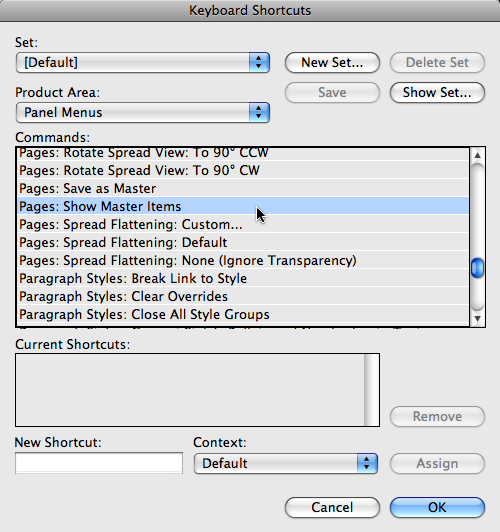
How to Fish for Keyboard Shortcuts
Okay, what if it’s not a panel menu feature? Where, then, should you look? The key is the Show Set button in the Edit Keyboard Shortcuts dialog box. Click that and InDesign writes your current shortcut set to disk as an (ugly) text file and opens it in your default text editor (TextEdit or NotePad, probably). From here, you can easily use that program’s Find feature to find the feature… then scroll up the list until you see which Product Area its living in:

The Keyboard Shortcuts Plug-in
In my opinion, the best way to find and asisgn keyboard shortcuts is to skip the Edit > Keyboard Shortcuts dialog box entirely and just use the free Keyboard Shortcuts plug-in from DTP Tools. With it, you can skip the whole “product area” problem entirely — just type a few letters of the feature you’re looking for into the blank field at the top and it will find it for you. It is the tool for power users who rely on shortcuts everyday:

(Note that the eagle eyed among you may notice a little bug in the above screen shot… it’s because I’m currently testing a beta version of a new “pro” version of this plug-in. It should be available sometime this summer.)
The Poster
Of course, no discussion of keyboard shortcuts would be complete without a mention of the super-duper InDesignSecrets Keyboard Shortcuts Poster! Of course, in this case, it wouldn’t help because the poster only shows shortcuts that are defined in the Default set. But if you’re looking for a feature that you know does have a shortcut, then the poster might be just the ticket.
This article was last modified on December 19, 2021
This article was first published on May 27, 2009
Commenting is easier and faster when you're logged in!

Recommended for you

Tip of the Week: Spring-Loaded Shortcuts
This little trick lets you switch tools in InDesign without missing a beat.

Quick GREP To Superscript Ordinals
Need to format all your ordinals (such as "1st" and "2nd") properly? This easy G...
Fixing the Keyboard Shortcut for Typographer’s Quotes on the Mac
When the InDesign keyboard shortcut for curly quotes stops working on your Mac,...