



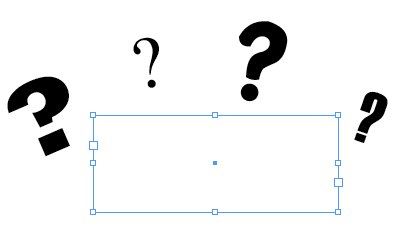
Is this a text box or text frame?
If you are a regular reader of indesignserets you should already know the correct answer – text frame. I can forgive people for saying text box since it may seem like the obvious answer, but it isn’t correct. Now, I am not trying to be a nerd and point out tiny insignificant flaws in someones answer (ex – Greedo shots first, which isn’t insignificant in my world), but it is important to use the correct terminology.

The problem with using incorrect terms is that it can lead to communication problems. Some of the confusion may come from experienced designers/production artists who have been using QuarkXPress for years and are accustomed to the old Quark term, but it can also propagates with new users who are ignorant to the correct terms and just make up something that seem to fit.
Example 1
Q: My text isn’t linking correctly, please help!
A: The technically correct answer to this would lead me to think that they are having problems with linked word documents or maybe they are using an InCopy work-flow and are having issues with assignments. In reality they are probably just trying to have text flow from one area of a page to another. The question should have be phrased, “Please help me thread my text frames”. Unfortunately, I rarely get asked a question in this manner and I have to guess as to what they are referring too.
Example 2
A user wants to have text flow around an image in their layout. Since they didn’t know the correct term (text wrap) they spent all day searching InDesign’s help system or Googling various keywords (runaround, text bump, image wrap, and so on). If you don’t know the correct terms it can make finding help next to impossible. I can’t fault the user for not knowing the term if they never learned it, but it goes to show the importance of using the correct language.
Example 3
A supervisor asks you to decrease the leading in the body text of your layout. As you follow their recommendation/order you change the leading from 14pt to 12pt and as a result the line spacing gets tighter. After you make this change they become furious with you because they meant for you to change the space between all of the letters (tracking), but they just used the wrong term. If they had used the correct word this situation would have been avoided.
What Can We Do About it?
My new years resolution that I hope to pass on to everyone is to try and use the correct term whenever possible. You don’t have to be a jerk and correct everyone that you meet if they use the wrong word, but try to use it whenever you speak or write to someone else about InDesign.
Here is a list of common words and phrases that I trying to teach people to speak intelligently when are referring to InDesign.
Wrong/Correct
- text box/text frame
- picture box/graphic frame
- import or get/place
- item tool or black arrow/selection tool
- content tool or white arrow/direct selection tool
- collect for output/package
- usage/links or find font
- fly-out menu/ panel menu
- palette/panel
- dot dot dot/ellipsis
- linking text boxes/threading text frames
- runaround/text wrap
Misunderstood Terms
There are some terms that get passed around the interchanged when they have
- Kerning – Changing the space between two characters

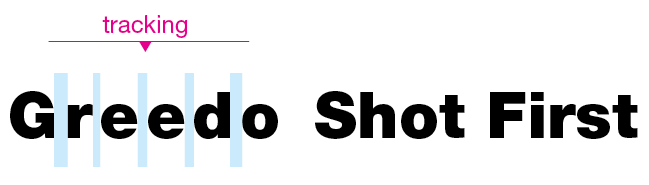
- Tracking – Changing the space between a selection of text.
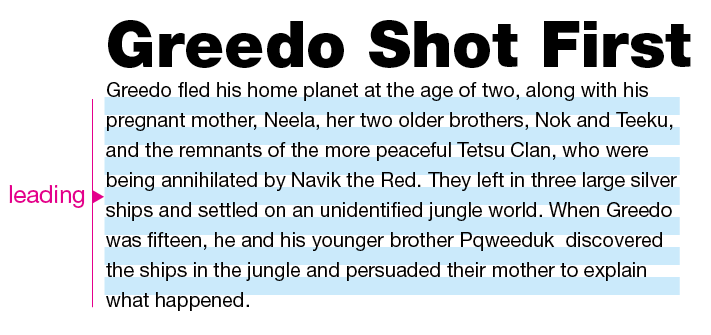
- Leading– Change the space between lines
- Kilobyte (K) – Tiny file size. ~1000k = ~1MB
- Megabyte (MB) – Medium file size. ~1000mb = ~1GB
- Gigabyte (GB) – Large File Size. ~1000gb = ~1TB (Terabyte)
This article was last modified on July 11, 2023
This article was first published on January 26, 2010
Commenting is easier and faster when you're logged in!

Recommended for you

Tip of the Week: Automatic Article Arrangement
This tip was sent to Tip of the Week email subscribers on July 24, 2014. Sign up...
Callas Software Launches Stand-alone Versions of Their Acrobat Plug-Ins
callas software expands the companies technology branch and launches Command Lin...

New Eyedropper Tool Options in InDesign CC 2018
When you double-click on the Eyedropper tool (keyboard shortcut: I) in InDesign...