




I used to wonder why anyone would want to use the Horizontal and Vertical Scale for text. I figured if I wanted text to be smaller or larger I would just specify a point size that is larger or smaller. 24 point could become 20. 12 point could become 17.
But a year ago I discovered a very legitimate reason for using Horizontal and Vertical Scale.
Consider the treatment of the word “TIP” in this text.

Notice how the first instance looks too big. So I need a way to reduce the size of the word. Obviously I will use a character style to apply the new font and reduce the text. But how?
Now look at the second instance. A character style has been applied to the word TIP so that it changes the font as well as reduces it in size. The word looks less cumbersome.
But this character style doesn’t apply a specific point size to reduce the text. Instead the character style reduces the text by a percentage, in this case 70% for both the Horizontal and Vertical Scale.
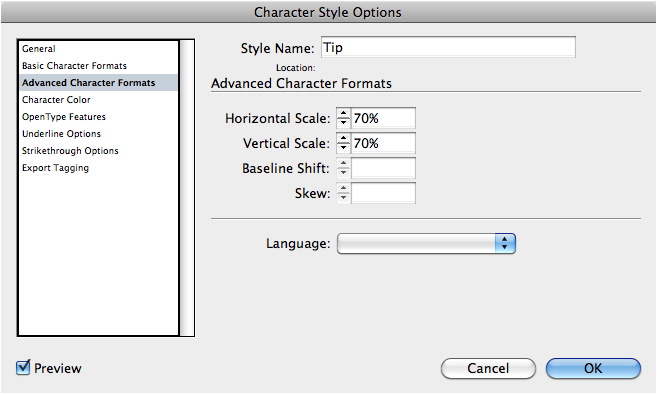
The Horizontal and Vertical Scale controls are found under the Advanced Character Formats area.
So what’s the benefit of using the Horizontal and Vertical Scale? By setting the size of the character style to a percentage, I give myself the freedom to change the point size of the main text without needing to also change the point size of the character style. It also means that the word TIP will always be 70%?not an actual point size?of the main text. I don’t have to jump through hoops to figure out what 70% of 14 point is and then, later on, figure out what 70% of 12 point is.
Before you go changing points in character styles, remember that Horizontal and Vertical Scale can also modify text.
This article was last modified on December 21, 2021
This article was first published on August 19, 2011
Commenting is easier and faster when you're logged in!

Recommended for you

Inconsistent Illustrator Image Contest Answer and Winner!
It’s time to reveal the solution—and the winner—for this month’s InD...

MIF Filter 1.0 Plug-in for InDesign CS2-CS3 Now Available
DTP Tools today announced the release of its new MIF Filter plug-in for InDesign...
Corel's AfterShot Pro Seeks to Lure Lightroom and Aperture Users
Bibble was a software program from Bibble Labs that helped you manage and improv...