




In the soon-to-be-released Creative Suite 2 Premium Edition from Adobe, there are enough changes to keep you exploring for weeks. Here are some of the most noteworthy improvements in Photoshop, Illustrator, GoLive, InDesign, and Acrobat 7.0 Professional.
CS2 Premium edition will be for sale in May for $1,199. If you’re a licensed user of Creative Suite 1, you can upgrade for $549; licensed users of Photoshop can upgrade for $749. Educational customers will pay $399.
Bridging the Gap
If you took advantage of the File Browser in the last few releases of Photoshop, you’ll love Bridge, a visual file browser that now spans all suite applications. (It’s also available in standalone copies of everything but Acrobat.)
Bridge tracks all sorts of files, from the expected PSD, AI, INDD, and PDF formats, to text documents and even movie files. To preview and manage the files, you launch Bridge from the File menu by clicking the Browse button in InDesign’s Control palette (Figure 1).
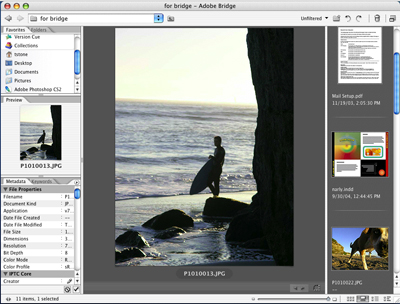
Figure 1: The new Bridge is packed with information about many kinds of files. Select a file and you’ll see metadata on the left; a large preview and other files in that folder are on the right.
The Bridge window has several panes. On the left are panes for navigating to files and viewing any keywords and metadata attached to them. On the right is a resizable preview pane. You can customize this pane by choosing between several views: Details, Filmstrip, Thumbnail, and Versions and Alternates. Once you spot the file you want, you double-click on the icon to open it.
If Bridge is eating up too much of your desktop, you can collapse it to the Compact mode. Because it floats above any open application, you can think of it as a palette inside InDesign.
- Work Faster: The preview options are pretty, but it’s the metadata that can really help you be more efficient. Say you need to locate all InDesign documents that relate to Corporation TIC, which are spread over several hard drives and the network. You know they share the corporate logo, typeface, and colors. So, in Bridge, you search the metadata and find every InDesign file that contains TIClogo.tiff, Futura, and Pantone 812 U. What could have been an hour-long task is finished in seconds.
Scripting in Bridge can be another goose to your productivity. Although most of the supplied scripts are for Photoshop, you can add your own that work with InDesign. (For more about that process, see “InDepth: Geeks Bearing Gifts,” elsewhere in InDesign Magazine Issue 5.) Note that multi-application scripts are available only when you buy the entire suite. - Browse and Buy: Bridge is the portal to a new service, Adobe Stock Photos. The company has gathered royalty-free images from eight major stock providers. In Bridge, you can search all libraries at once by keyword, media type, photo orientation, and provider (Figure 2).

Figure 2: Despite its name, you can search for illustrations as well as photos in the new Adobe Stock Photos. Here you see the results for a search for color illustrations with the keyword “pear.”
When you find an appropriate image or images, you can download low-resolution comps that aren’t watermarked. And, of course, you can buy the images with just a few clicks. Even if you’ve changed the comp’s filename, Adobe Stock Photos can find the original image for purchase. - Version Cue: Introduced in the original Creative Suite, Version Cue was designed to let individuals and workgroups track and share files more easily. Most people who tried it once decided it wasn’t worth the effort and promptly forgot about it. In CS2, Version Cue is a more viable option. The interface is much more intuitive, and because you reach it from Bridge, it’s easier to include Version Cue in your daily workflow.
- Bridge Center: Bridge Center comes only with the suite-wide version of Bridge. You access Bridge Center by clicking on its name in the Favorites list on the left-hand side of the Bridge Window. It includes hints on using the suite, an RSS news feed reader, and a list of recently used files.
Get In Synch
Adobe says that colors are now consistent across all the CS2 applications, and you can export color swatches from one application to be imported elsewhere. You can also synchronize color-management settings. To do so, open Bridge, go to Edit>Creative Suite Color Settings, select a setting from the list, and click Apply. Simple!
In another bid for consistency, Adobe has standardized the PDF export presets in all suite applications — whether you export from InDesign or use Distiller, you’ll see the same six default presets in the same interface. More importantly, you can create a preset in one application, such as Distiller, and use it in other suite programs.
Photoshop CS2
Photoshop is bursting with new features. Here are five of the most noteworthy.
- Vanishing Point: Photo retouchers are going to love this time-saver. The Vanishing Point tool lets you define a perspective plane with one or more grids. Those grids keep the image looking realistic as you, for example, duplicate a window on the sunny south side of a building on its shady east side.
- Reduce Noise: This filter is straightforward in name, and straightforward in results. You can fine-tune options for strength, detail preservation, color noise, and JPEG artifact removal.
- Smart Sharpen: Some digital cameras oversharpen images. The Smart Sharpen filter lets you correct this flaw with controls not available in Unsharp Mask.
- Multi-Image Camera Raw: Now you can edit and adjust the settings of several RAW images at once.
- Image Warp: This on-canvas effect lets you twist and turn any graphic. Among other things, it’s a handy way to mock up a three-dimensional package.
Illustrator CS2
Illustrator adds tools that help you work smarter and enjoy what you’re doing more.
- Live Trace: If you’ve missed Adobe Streamline, you’ll be happy to hear of Live Trace’s debut. Like Streamline, Live Trace converts bitmaps to vectors, but with even more control and smarts.
- Live Paint: When you color in outlines on a piece of paper, you don’t have to think about how a sketch was constructed or layered-you just add color based on what you see. Live Paint brings this kind of freedom to Illustrator by converting images to editable Live Paint objects.
- Photoshop Integration: Now you can preview and import single or multiple layer comps in a Photoshop file, and change the layers as you wish once they’re in Illustrator. You can also use Photoshop’s Filters and Effects from within Illustrator. The effects are non-destructive, though filters are not.
- Control Palette: InDesign users will have deja vu when they see Illustrator’s new Control palette. This context-sensitive palette lets you select the right tool fast, and without opening palette after palette.
- Mobile Content :Support Adobe is betting that design for mobile phones will become a big thing. That’s why Illustrator CS 2 includes support for two nascent mobile formats, SVG Tiny and SVG Basic.
GoLive CS2
This application, which once was such a misfit among the Adobe apps, is coming into its own.
- Visual DIV Control: Coding CSS is a pain in the butt. There, I said it. GoLive can’t lift all of that burden from you, but new features to select, draw and position CSS DIVs go a long way toward easing the pain.
- Ready-to-Go CSS: Block Objects Just drag and drop CSS block objects, such as a 3-column layout with a liquid center, onto your GoLive page.
- More Mobile Support: Adobe has a point-there are a heck of a lot of cell phones in the world. GoLive helps you author for the platform by converting XHTML to XHTML Mobile Profile. You can also create CSS Mobile profiles visually. The new SVG Editor includes views that make it easier to work with SVG Tiny files.
- Favicon Creation; The digerati call them “favicons,” while the rest of the world knows them as “those images next to a page’s title in a Web browser’s Favorites or Bookmarks menu.” Whatever the name, favicons are normally hard to produce. In GoLive CS 2, Smart Favorite Icons are as easy to create as Smart Objects.
InDesign CS2
There are so many new features in InDesign CS2, InDesign Magazine Issue 5 has 26 pages about them. To get the details, you’ll have to buy the issue for $9, or subscribe for a year for $59. But here’s a quick overview of what to expect from the upgrade.
- Object Styles: Similar to paragraph styles, object styles let you save and apply a combination of effects to objects. Update the style, and all those objects change automatically.
- Quick Apply: Find character, paragraph, and object styles fast — even if you can only remember a few letters of a style’s name.
- Transform Again: Apply identical transformations to disparate elements.
- Anchored Objects: Like inline objects, anchored objects flow with your text as it changes. Unlike inline objects, you can place anchored objects anywhere on a page.
- PSD and PDF Layer Control: Turn layers — even comp layers — on and off within InDesign.
- Better Text Handling: Whether you need to style footnotes or import Word documents, it’s easier in CS2.
Acrobat 7.0 Professional
Acrobat continues to cater to the business market, but there are still design- and production-oriented enhancements to this version.
- Centralized Production: The new Print Production bar includes buttons for preflighting, converting color spaces, managing ink, adding printer marks, fixing hairlines, flattening transparency, defining job definition files, and more.
- Preflight Droplets: Automate your file-checking by saving a profile as a batch command, also called a droplet, then drag and drop PDFs on the droplet to perform basic preflighting.
- Get Organized: You may not be able to access Bridge from Acrobat, but Acrobat has its own tool: the Organizer. From inside this window, you can browse thumbnails of all your PDFs and trace your usage history — you’ll even see files you viewed online but didn’t download to your desktop. The Organizer also lets you sort, print, and email PDFs.
- Commenting for All: No more client complaints about not being able to comment during PDF review cycles. As long as you turn on the commenting tools in Acrobat 7.0 Professional, users of the free Adobe Reader 7.0 can pipe up, too.
- Such a CAD: You can now convert Autodesk AutoCAD and Microsoft Visio documents to multi-layered PDF files, and join multiple AutoCAD layouts into one PDF. Also, Acrobat retains the embedded AutoCAD scale.
Terri Stone is the Editor in Chief of InDesign Magazine and creativepro.com.
This article was last modified on January 10, 2022
This article was first published on April 5, 2005
Commenting is easier and faster when you're logged in!

Recommended for you

Illustrator’s Other Drawing Modes
If you use Photoshop, Illustrator, or InDesign, you ought to be familiar with bo...
Make a Grungy Logo in Photoshop
If you’re a seasoned Photoshop user, this little tutorial might not be for...

From Paper to PDF: Vectorizing Hand-Drawn Artwork with Photoshop and Illustrator
I have a close friend, Mike Manoogian, who is a brilliant lettering and logo des...