



OK, I’m not completely an alarmist and with great help from Steve Werner and Peter Truskier I have been able to get a handle on what to do.It is safe to upgrade to QT 7.1.3. However, when you do, you want to check the Enable Flash preference in the Preferences palette.
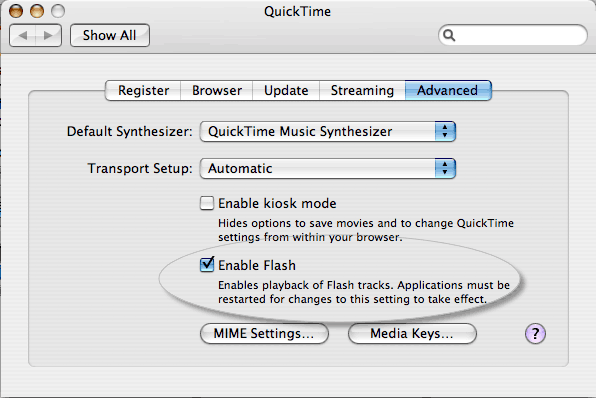
On the Mac, go to the Apple menu and choose System Preferences. Then click the QuickTime icon to open the QuickTime preferences.
Click the Advanced tab and then click the Enable Flash option. This will allow InDesign to import multimedia content.
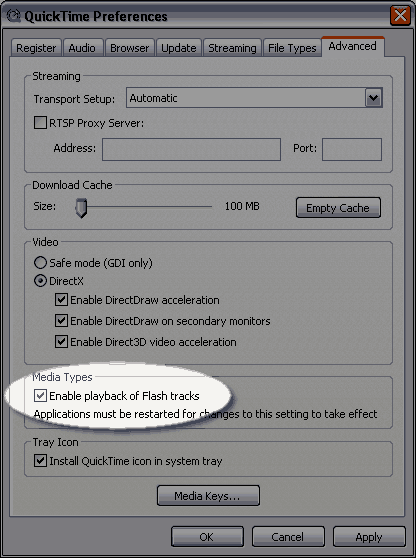
On Windows, launch the QuickTime Player application and then choose Edit > Preferences. Click the Advanced tab and then click Enable Playback of Flash Tracks.
There is one glitch to the above information. If you are running InDesign on one of the new Intel Macs, this fix does not seem to work.
It is most likely an issue with Rosetta.
This article was last modified on December 18, 2021
This article was first published on October 9, 2006
Commenting is easier and faster when you're logged in!

Recommended for you

Tip of the Week: Convert Corner Effects to Paths
With this tip to convert corner effects to paths, you can combine corner effects...
Tip of the Week: Pasting Photoshop Vector Paths into InDesign
There are three new Links panel icons in InDesign CC that you'll see when workin...

OMG! Drag-and-Drop to Excel!
How to save a huge amount of steps when manually transferring text from InDesign...