



InDesign CS5 really helps us keep our balance (and sanity). Working with vertically justified column text in the past (InDesign CS4 and earlier) has been a painful balancing act.

Balancing madness in InDesign CS4 (and earlier).
The following are some of the issues that affected our balancing sanity PRE Adobe’s Creative Suite 5:
- Text frame interaction with objects containing text wrap set to Wrap around bounding box or Wrap around object shape would set the vertical justification alignment option to inactive (Object > Text Frame Options), which meant the text frame setting could not be altered once interacting with the object(s).
- Depending on where the object with text wrap interacted with the text frame, the vertical justification alignment setting might be ignored, instead applying a top alignment. Enabling corner options on the text frame (Object > Corner Options) would do the same thing.
- Text across columns that had vertical justification alignment set to be ‘justified’ would justify nicely in all BUT the last text column. The last text column would display a wonderful (NOT!) accordion paragraph lines effect (well, that’s the name I’ve given it in the past? ;) ).
We’d be fiddling with leading, kerning, tracking, space before/after settings to try and get our columns nicely balanced? and after each document review phase (read: editors making changes to text), we’d have to repeat that balancing act… I am convinced this previous behavior has been the cause of stress for many!
If you are still experiencing this stress today, then please, please, please… upgrade to InDesign CS5 and you’re life will be back in the balance… Not only that, you can use a single column text frame (using split/span columns feature) to set the example below!

InDesign CS5, automatic column balancing justified text.
So what balancing changes do we see in InDesign CS5?
- Interaction with an object containing text wrap no longer affects the vertical justification alignment setting.
- Applying corner options to a text frame no longer affects the vertical justification alignment setting.
- Enabling the ‘justified’ vertical alignment setting, automatically balances all columns, the accordion effect in the last column is a thing of the past.
Yes, you don’t even need to enable the Balance Columns option (Object > Text Frame Options) when you set Vertical Justification to Align: Justified. InDesign just knows that it should NOT create a accordion last-column! How cool is that! You’d enable the Balance Columns option to set automatic column balancing for other vertical justification alignments.
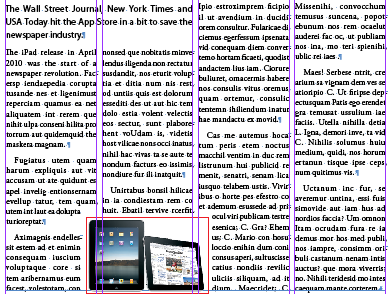
Vertical balance and text wrap in InDesign CS5
What can I say! Thank you Adobe for helping all of us retain our sanity :) and bringing happiness and smiles into the workplace :)
This article was last modified on December 20, 2021
This article was first published on March 5, 2011
Commenting is easier and faster when you're logged in!

Recommended for you

Preflighting eBooks for Overrides
With the help of the Preflight panel, a plug-in, or a cool script, you can spot...
CS5 bug with anchored objects on spreads
Beware of this bug that can make anchored objects fail to print or output to PDF...
How to create guides shorter (or longer) than the page
Did you know you can create guides that are shorter than the width or height of...